

Contents
- Key Takeaways
- Quick Answer: What is AI Website QA Testing?
- Why AI Website QA Matters
- Types of AI Website QA Testing
- How AI Testing Tools Actually Work
- How to Set Up AI Website QA Testing: Step-by-Step Process
- AI Website QA Testing Best Practices
- Choosing the Right AI Testing Tool
- AI Website QA Testing Tools
- Common AI QA Testing Challenges (and How to Solve Them)
- Where Visual Feedback Fits in Your AI QA Process
- How BugHerd Helps with QA Testing
- Start Your Free Trial
- Real Results: How Teams Improve Website QA with BugHerd
- Frequently Asked Questions
Key Takeaways
- AI website QA testing uses AI agents to crawl a site and flag functional bugs, visual regressions, and accessibility issues, faster than a manual pass but still requiring human review.
- Types of AI QA testing include visual regression, functional, accessibility, cross-browser, performance, and exploratory testing, each catching a different category of issue.
- The step-by-step process covers how to define scope, choosing a tool, setting baselines, running scans, triaging what's flagged, assigning fixes, and scheduling recurring scans.
- Best practices center on combining AI detection with human review, since AI can spot differences at scale but can't weigh business priority.
- Choosing a tool comes down to test case generation, framework compatibility, self-healing, hosting model, pricing, and ease of triage.
- How BugHerd helps: BugHerd isn't an AI testing tool. It's a visual feedback tool agencies bring in separately, so clients can review content and layout on the live site, with BugHerd's own AI features speeding up how that feedback gets actioned.
Quick Answer: What is AI Website QA Testing?
AI website QA testing is the use of artificial intelligence agents to automatically crawl, inspect, and detect visual bugs, functional errors, and accessibility issues on live or staging websites, reducing manual testing effort by identifying defects before a human ever needs to look for them.
Why AI Website QA Matters: Faster Bug Detection for Development Teams
Websites have grown more complex, and manual QA is struggling to keep pace. A single site update can touch dozens of templates, breakpoints, and browser combinations, and a person clicking through pages one at a time cannot catch everything. A button that shifts two pixels on mobile Safari, or a layout that quietly breaks at one screen width, can go unnoticed until a client points it out.
This is the gap AI website QA testing fills. An AI agent crawls the site, compares what it finds against an expected baseline, and flags anything that looks off, a similar principle to the one behind resources like W3C's web standards and web.dev's testing guidance: as sites grow more dynamic, testing needs a structured, scalable approach rather than depending on how many hours a QA team has in a week.
Types of AI Website QA Testing
- AI visual regression testing: compares live screenshots against an approved baseline to catch layout shifts, broken elements, and rendering errors. It's the most common entry point for teams adding AI to QA, since visual bugs are hardest to catch manually across every breakpoint.
- AI functional testing: tests user flows like forms, checkout, and navigation to confirm they still work after a change, running each flow repeatedly across browsers instead of a person clicking through by hand.
- AI accessibility testing: checks pages against WCAG guidelines automatically, flagging missing alt text, poor color contrast, and keyboard navigation issues. It won't replace a full manual accessibility audit, but it catches common issues early.
- AI cross-browser testing: renders pages across browsers and devices to catch inconsistencies a team would otherwise need separate physical devices for, or significant manual effort working through emulators, to find.
- AI performance testing: monitors load times, Core Web Vitals, and resource usage over time, so a slow-creeping performance issue gets flagged before it affects rankings or user experience.
- AI exploratory testing: rather than running a fixed script, some AI agents explore a site the way a curious visitor might, trying edge cases a scripted test would never think to check.
- Testing mobile apps: many AI QA platforms extend beyond websites, running the same detection logic across mobile apps, so agencies delivering web and mobile applications can run one review process across both.
How AI Testing Tools Actually Work
Most AI testing tools follow a similar way of working, even when the interface differs. Knowing where AI fits into the mix of automation and human judgment helps when comparing options.
AI Test Case Generation
Rather than a manual tester writing test scenarios line by line, AI tools can read user stories, product requirements, or plain text and generate structured test cases automatically. Some use generative AI and code generation to turn a short brief into a working test suite. Generated tests still need a human to check they close coverage gaps and cover the edge cases that matter.
Natural Language Test Creation
A growing number of tools let engineering teams and non-technical teams describe a test in plain English rather than code. Type out what should happen (a user adds an item to the cart and checks out), and the AI turns it into an automated test, flattening the learning curve for QA engineers and opening test creation up to product managers and designers.
Self-Healing Tests and Reduced Maintenance
Automated tests often break not because of a real bug, but because a small UI change, like a button ID shifting during a routine update. Self-healing tests use AI to recognize the intent behind a test step and adjust automatically instead of failing outright, reducing test flakiness and cutting the hours spent untangling flaky and broken tests after every release.
Root Cause Analysis and Visual Validation
When a test fails, AI can speed up root cause analysis by scanning logs, network traffic, and execution traces to point at what changed. On the visual side, AI sets visual checkpoints against a baseline for visual change detection and visual validation, flagging pixel-level differences a scripted test would miss.
Predicting Where Bugs Are Likely to Hide
Some AI test automation tools use machine learning models to study historical data, like past bugs and system logs, predicting which parts of a site are most likely to contain defects after a change. Rather than re-running an entire test suite every time, the tool uses codebase context to prioritize the existing tests most relevant to what changed.
Continuous Testing in CI/CD
Most AI testing tools plug into a CI/CD pipeline so tests run automatically every time code changes reach the web server. Test results come back within minutes of a commit, catching a regression before it reaches staging, let alone production.
Generative AI and the Future of Test Creation
Generative AI is pushing test creation further, generating entire test scripts from a short natural language brief rather than individual steps. Agentic tools go further again, producing portable test code that runs on standard frameworks instead of a closed system, so switching vendors doesn't mean rewriting an entire test suite.
How to Set Up AI QA Testing for Websites: Step-by-Step Process
Step 1: Define your QA scope
Decide which pages, environments, and bug types you want the AI agent to cover before setting anything up. Most teams start narrower than expected: staging only, core user flows, visual and functional bugs first. Casting too wide a net on day one usually just floods the team with low-priority flags before anyone's built trust in what the tool is actually finding.
Step 2: Choose your AI testing agent
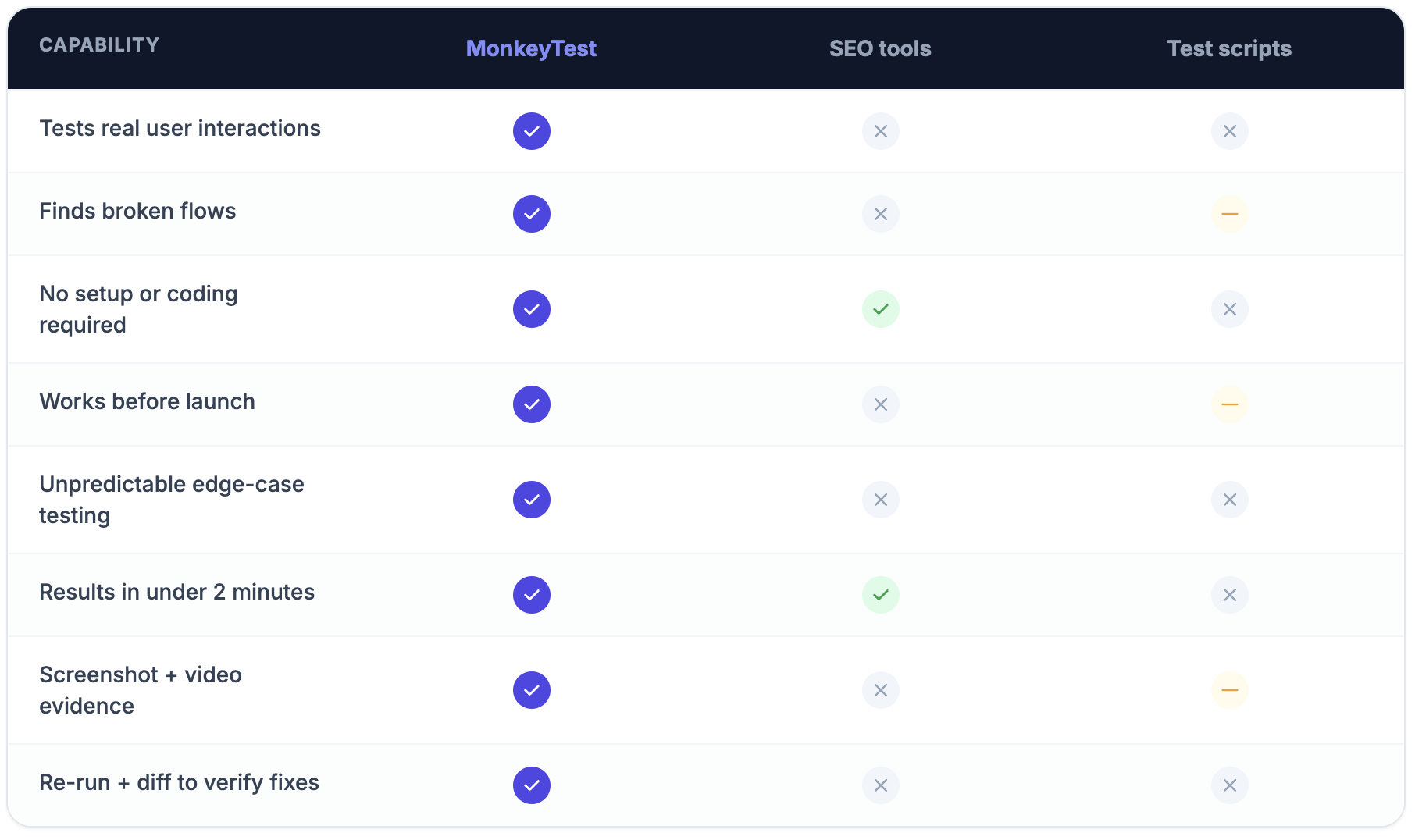
Not every AI QA tool does the same job. Some, like MonkeyTest, focus on visual bug detection for websites; others are broader enterprise suites built for mobile and web apps.
Step 3: Set up baseline screenshots and expected behavior
The AI agent needs something to compare against: approved baseline screenshots of key pages and a clear definition of what "correct" looks like.
Step 4: Run your first AI scan
Configure the crawl depth, exclude pages that don't need testing, and set a sensitivity level. Start conservative, a tool flagging every pixel difference will bury real issues under false positives.
Step 5: Review and triage what's flagged
An AI agent can surface a hundred issues in an afternoon, and not all matter equally. Your QA lead reviews the results, filters false positives, and prioritizes what's worth fixing, a broken checkout flow ranks differently to a one-pixel shift on a rarely-visited page.
Step 6: Assign and resolve
Direct confirmed issues to developers through your project management tool. Most AI testing tools integrate with Jira, Asana, or GitHub, so a triaged bug becomes a task in the same place your team already works.
Step 7: Schedule recurring scans
A one-off scan tells you what's broken today. Recurring scans, weekly or after every deployment, catch regressions as they happen instead of surfacing three sprints later.
AI Website QA Testing Best Practices
- Combine AI detection with human review. AI is good at spotting differences, but it can't judge whether one actually matters. A shifted button on a rarely-visited page isn't the same priority as a broken checkout form.
- Use a visual feedback tool for client and stakeholder sign-off on content and layout. AI testing tools handle functional bugs, but they're not built to catch a typo, an off-brand image, or a layout that just doesn't look right. Pair one with BugHerd so clients weigh in on what they can actually judge.
- Test on staging before production. AI QA agents work best against a stable environment, catching issues before they reach a live site.
- Set up integration pipelines early. Connect your AI QA output to your project management tool from the start rather than retrofitting it later.
- Track QA velocity metrics. Time-to-detection and time-to-resolution tell you whether the workflow is actually working.
- Don't let the AI agent make the final call. Automated detection should feed into a human-reviewed process. Sign-off is still a person's decision.
Choosing the Right AI Testing Tool
With dozens of AI testing tools now on the market, from lightweight visual checkers to full enterprise platforms, picking the right one comes down to a handful of practical questions.
What Features to Look For
AI Website QA Testing Tools
AI testing agents
Tools like MonkeyTest, testers.ai, Jekka.ai, and RobotQA are specialized AI agents built to detect bugs autonomously, scanning a site and generating a report, the detection layer of AI QA testing.
AI test automation tools
Platforms like Momentic and Mabl focus on AI test automation rather than just flagging visual bugs, generating and running automated tests as part of a broader test suite. Momentic's own Series A announcement reports that, as of November 2025, it was executing more than 200 million test steps and catching over 390,000 bugs in a single month, with customers running over 2 billion steps since 2024. Mabl integrates AI for low-code test automation, building tests from screen recordings and natural language.
Visual AI
Applitools specializes in visual AI, using pixel-level comparison to catch visual regressions across browsers and devices. On its own site, it cites one customer, EVERFI, saving an estimated $1 million a year after adopting the platform.
Sauce Labs and cross-browser infrastructure
For teams that need a wide cross-browser testing matrix without maintaining their own device lab, Sauce Labs is an established platform, tested across Chrome, Firefox, Safari, and Edge on desktop and mobile.
AI QA platforms
Sofy.ai and Rova are broader enterprise suites with AI-driven test generation, built for teams running QA across mobile and web apps at scale.
Visual feedback tools
Tools like BugHerd, Markup AI and Userback sit in a different category. They don't crawl a site or detect bugs; they give clients and stakeholders a way to review a live page and leave feedback on content, layout, and design, the kind of feedback AI testing tools aren't designed to catch.
For a full comparison of website QA tools, see our guide to the best website QA tools.
Common AI QA Testing Challenges (and How to Solve Them)
Most problems with AI QA testing aren't about the tool itself, they're about the process around it.
- False positives bury real issues. A tool that has been too finely tuned and flags every minor pixel shift alongside genuine regressions, means teams stop trusting the results. Start conservative on sensitivity, and tighten it as your baseline gets more reliable.
- Flagged issues don't come with a priority. A broken checkout and a shifted footer link land in the same report with no ranking between them. Route everything through a triage step (Step 5) before it becomes work for a developer.
- Client feedback gets left out of the process. Teams that only run AI functional testing often skip a proper content and layout review, and issues a client would have caught slip through to launch. Bring in a visual feedback tool alongside the AI testing agent, not after it.
- Regressions creep back in between scans. A one-off scan only catches what's broken the day it runs. Scheduling recurring scans (Step 7) closes this gap.
- Detection gets mistaken for the finish line. Finding a hundred bugs isn't the same as fixing them. Without a clear assign-and-resolve step, flagged issues pile up in a report nobody works through.
Where Visual Feedback Fits in Your AI QA Process
Between choosing the right AI testing agent, running scans, and triaging what gets flagged, it's easy to treat AI QA testing as the whole job. It's important to remember that it's only half the job. It's the half that scales, catching functional bugs and regressions faster than any manual pass ever could. The other half, whether the content reads well and the layout actually looks right, still needs a client's eyes on the live page.
That's the gap BugHerd fills. It's not competing with your AI testing agent, it's the simple, non-technical layer that sits alongside it, giving clients a way to review and comment without leaving the page. Pair the two, and your QA process covers both what AI can catch and what still needs a human call.
How BugHerd Helps with QA Testing
BugHerd is a visual feedback tool built for agencies and web development teams, giving clients and stakeholders a way to review a website directly, leaving comments on layout, content, and design by clicking on the page itself. It's not an AI testing tool, and it doesn't crawl a site, generate test cases, or detect bugs. It's built for a different job: catching what a functional testing tool can't judge, whether the copy reads well, a layout looks right, or a design matches what was agreed.
AI testing tools and BugHerd typically run as two separate steps, not one workflow. Agencies run an AI testing agent themselves for functional QA, catching broken flows, accessibility issues, and visual regressions before a client sees the site. Once that pass is done, clients use BugHerd to provide feedback on content and layout. They simply point, click, and comment directly on the live or staging page without needing any technical background.
BugHerd also has its own AI features that help agencies move faster once client feedback starts coming in. Auto-tagging, auto-title generation, and similar task detection sort and summarize feedback automatically, keeping the task board organized without manual admin. With BugHerd MCP, teams can connect that feedback to AI tools like ChatGPT, Claude Code, and Cursor to help triage and making changes directly in your codebase, CMS or design tool.
Start Your Free Trial of BugHerd
Start a free 7-day trial (no credit card required) and check out BugHerd for yourself, or book into a 1:1 demo with a BugHerd product expert to see how it can work for your agency.
Real Results: How Teams Improve Website QA with BugHerd
The agencies below aren't using BugHerd to detect bugs, that's what their AI testing tools handle separately. They're using it for the review an AI testing tool can't do: getting clients to weigh in on content, layout, and design, directly on the live page. Luminary cut feedback reconciliation time by 80%; Manifest reduced bug resolution time by more than 75%.
"BugHerd provides a consistent, easy-to-implement approach for capturing effective feedback from stakeholders and testers." Luminary — Marty Drill, Founder & CEO. Read the full case study
"Manifest wanted to consolidate from multiple platforms into one central place." Manifest Digital. Read the full case study
"BugHerd takes the guesswork out of feedback, keeps everyone aligned, and lets us focus on building better websites." Squareone Software — Elliott Richmond, Director & Lead Developer. Read the full cast study
"It made it so much easier for them to leave feedback directly on the site." SEO Melbourne — Girish Sawlani, Strategy & Growth. Read the full case study
Frequently Asked Questions About AI Website QA Testing
What is AI website QA testing?
AI website QA testing uses AI agents to automatically crawl a website and detect visual bugs, functional errors, and accessibility issues, cutting down the manual testing a team needs to do.
What is the difference between AI QA testing and manual QA testing?
Manual QA relies on a person working through pages and flows by hand. AI QA testing automates detection at a speed and scale a manual pass can't reach, though human review is still needed to judge which issues matter.
Which AI tools can automatically find bugs on my website?
Tools like MonkeyTest, testers.ai, Jekka.ai, and RobotQA are built to crawl websites and detect visual and functional bugs automatically.
How does BugHerd fit into an AI QA testing workflow?
AI testing tools handle functional QA, testing flows and catching bugs automatically. BugHerd is a separate, client-facing step: once functional testing is done, agencies use BugHerd to get content and layout feedback directly from clients on the live site.
Is BugHerd an AI testing tool?
No. BugHerd doesn't crawl your site, generate test cases, or detect bugs. It's a visual feedback tool that clients and stakeholders use to review content and layout on a live page. BugHerd does have its own AI features, like auto-tagging and similar task detection, that help agencies process feedback faster once it comes in.
Can BugHerd integrate with AI testing tools like MonkeyTest or Sofy?
Not directly. The two typically run side by side: an AI testing agent handles functional testing, and BugHerd integrates with project management tools like Jira, Asana, GitHub, and Trello so client feedback reaches developers the same way.
How much does BugHerd cost?
BugHerd plans start from $42/month.
Does BugHerd have a free trial?
Yes, BugHerd offers a 7-day free trial with no credit card required.
Is BugHerd better for agencies than other website QA tools?
Agencies managing multiple client sites benefit from BugHerd's non-technical, point-and-click feedback model, since clients can flag issues without any QA background. See our website QA tool for agencies use case for more detail.
What is the best AI QA testing tool for website projects?
It depends on what you need to catch. Visual bug detection, functional testing, and accessibility testing each have different specialist tools, and most agencies pair one with a separate visual feedback tool for client sign-off.
Can AI replace manual website QA completely?
Not entirely. AI agents can find far more differences than a person scanning manually, but they can't judge business priority or context the way a person can. The most effective QA workflows combine AI detection with human review.

Marina Domoney
Marina Domoney is Marketing Communications Lead at BugHerd and a senior B2B marketer with 20+ years’ experience in SaaS and website delivery workflows. She’s worked closely with agencies, creative teams, and developers across countless web projects, giving her practical expertise in design and website feedback, approvals, and client collaboration.
Try BugHerd on your site
See feedback in context
Click anywhere to leave feedback directly on your website.









But don't just take our word for it.
BugHerd is loved by 10,000+ companies,
350,000+ users across 172 countries.
4.8/5
4.7/5
4.5/5
5/5
8.7/10
Sam Duncan 📱📏 🌱
@SamWPaquet
"@bugherd where have you been all my life??
We just migrated our bug tracking over from Asana and have at least halved our software testing time🪳👏📈. "
Ashley Groenveld
Project Manager
“I use BugHerd all day every day. It has sped up our implementation tenfold.”
Sasha Shevelev
Webcoda Co-founder
"Before Bugherd, clients would try to send screenshots with scribbles we couldn't decipher or dozens of emails with issues we were often unable to recreate."
Mark B
Developer
“A no-brainer purchase for any agency or development team.”
Kate L
Director of Operations
"Vital tool for our digital marketing agency.”
Paul Tegall
Delivery Manager
"Loving BugHerd! It's making collecting feedback from non-tech users so much easier."
Daniel Billingham
Senior Product Designer
“The ideal feedback and collaboration tool that supports the needs of clients, designers, project managers, and developers.”
Chris S
CEO & Creative Director
“Our clients LOVE it”
Emily VonSydow
Web Development Director
“BugHerd probably saves us
at least 3-4hrs per week.”