BugHerd - the website QA tool that makes it easy for your clients to leave feedback

Stop chasing website feedback by email. BugHerd lets your team and clients pin issues directly on the website. Every comment arrives with a screenshot, browser, OS, and all technical details.

Have questions about BugHerd? Book a demo.
green tick icon

No credit card required.

In-context website feedback

Forget about long email threads or confusing spreadsheets. With BugHerd, your clients and your team can simply click and comment directly on a web page as they review it, ensuring precise feedback on design, functionality, and content.

icon
Automatic capture of technical information

BugHerd automatically captures a screenshot with each comment left on the website, along with technical details, like browser, operating system, exact URL, screen resolution and more. Everything you need to resolve bugs and feedback fast.

icon
Task tracking

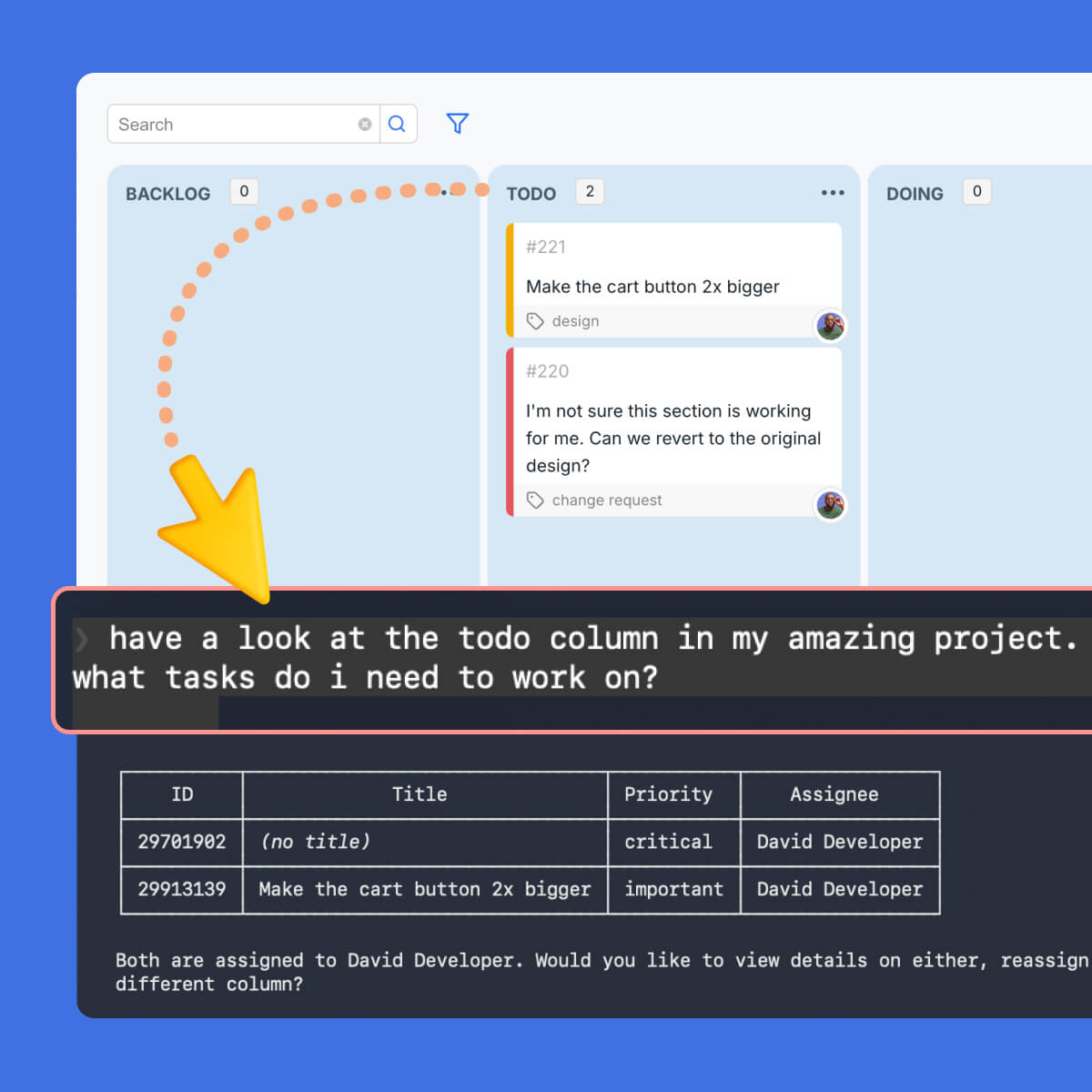
BugHerd’s integrated Kanban board transforms client feedback on websites into trackable tasks. Assign tasks to your team, prioritize issues, and track them to completion. BugHerd lets you easily manage website feedback and bug reports, from one central location.

Join 10,000+ companies, 350,000+ users across 172 countries.

arrow icon

What is Website QA Testing? 

Website QA testing (quality assurance testing) is the process of systematically checking a website for bugs, visual inconsistencies, broken functionality, and cross-browser issues before it is published or handed over to a client.

For web agencies, website QA is the critical stage between “build complete” and “client sign-off.” A structured QA process reduces revision rounds, and keeps project timelines on track. BugHerd is built specifically for this workflow: testers log issues directly on the live or staging site, with all technical context captured automatically, so nothing gets lost between QA and the development team.

The Problem: QA Often Slows Web Projects Down

Most agencies run website QA through a combination of email, spreadsheets, and screenshots. It works … until it doesn’t. Here’s what breaks down.

Clients describe bugs, not locations

The header looks wrong on my computer.”  - But on which page? Which browser? At what screen size? Every vague report costs your team 20 minutes of back-and-forth before anyone starts fixing.

QA issues get lost between tools

Bugs reported by email or in a shared doc rarely make it cleanly into Jira or ClickUp. Your developers are working from incomplete information while the client thinks issues are being tracked.

No visibility across multiple projects

When you’re running QA on three client builds simultaneously, spreadsheets collapse. There’s no single view of what’s open, what’s fixed, and what’s blocking sign-off on each project.

Client sign-off gets delayed

Without a structured QA process, clients keep finding new issues after you thought you were done. Launch dates slip, revision rounds multiply, and margin disappears.

How BugHerd Helps with Website QA

BugHerd helps you go from the website build to complete to client sign-off faster, and fits into your agency QA workflow without changing how your team works. Here’s how a typical project runs with BugHerd.

1. Set up a project for the client site

Create a BugHerd project and install the browser extension or add a JavaScript snippet to the staging site. Takes under two minutes. Works on any URL - live or staging.

2. Your QA team works through the site

Testers click directly on any element to pin an issue. BugHerd automatically captures a screenshot, browser type and version, operating system, screen resolution, and the exact page URL. No chasing technical details - it’s all there from the moment the pin is dropped.

3. Invite the client to review

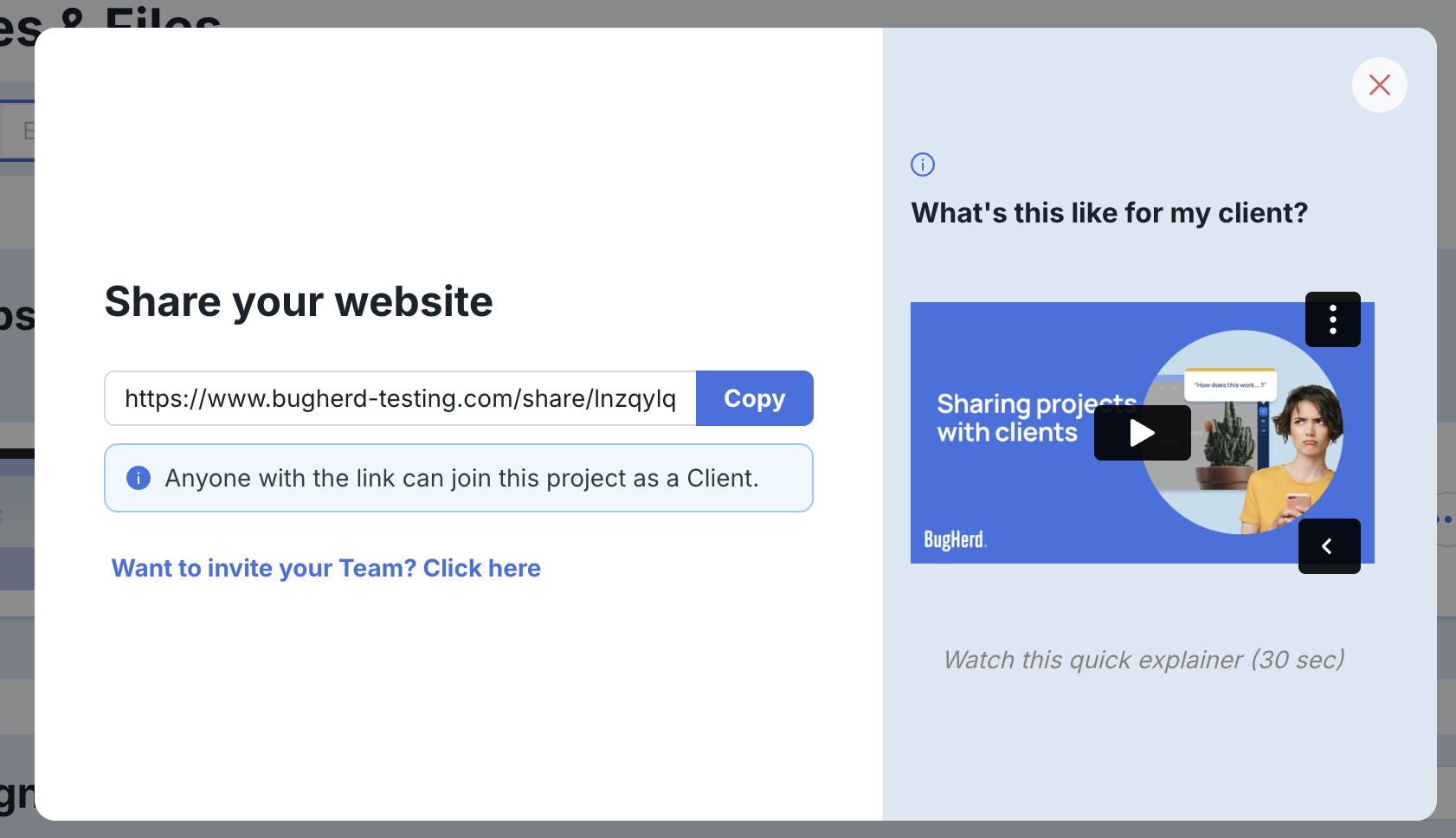
Send the client a link - no account or login required. They can browse the site, pin their own feedback, and respond to existing issues. Their comments land directly on the task board alongside your QA team’s findings.

4. Bugs become tasks in your existing tools

Every pin becomes a trackable task on BugHerd’s Kanban board, or syncs directly into Jira, Linear, ClickUp, Asana, or wherever your developers work. Assign, prioritize, and track to resolution without leaving your workflow.

5. Sign off and launch with confidence

When all issues are resolved, the task board is the source of truth. Your QA lead can see at a glance that every reported issue has been addressed, and the client has a clear record of what was fixed before the site went live.

BugHerd Features -  What an Agency Needs to Run Clean Website QA

Deliver high-quality website QA with a simple, structured feedback process. BugHerd lets clients and teams leave clear, in-context feedback directly on a website, making it easy to report issues, review changes, and manage QA across both technical and non-technical stakeholders.

Issues pinned to the exact element - not a vague description

Instead of “the button on the contact page looks broken”, your testers can click directly on the button. BugHerd pins a comment exactly where an issue occurs on a specific page, so developers know precisely what to fix without a follow-up conversation.
  • Pins locked to the page element - not just screen coordinates
  • Annotate anything: text, images, forms, navigation, footers
  • Video walkthroughs for multi-step bugs or glitchy animations
  • Works on live sites and staging environments
Learn More

Full technical context captured automatically

Every pin your QA team drops includes browser type and version, operating system, screen resolution, viewport dimensions, the exact URL, and an annotated screenshot, all captured automatically. This includes:
  • Browser type and version (Chrome, Safari, Firefox, Edge)
  • Operating system and version Screen resolution and viewport dimensions
  • Exact URL
  • Annotated screenshot at time of report
Learn More

Clients give feedback without needing an account

Send your client a link. They can browse the staging or production site, pin feedback directly on the element of a page, and respond to your QA team without creating an account or downloading anything. This is the feature agencies tell us changes everything about client review rounds.
  • No account or login required for clients
  • Clients see a simplified view — their feedback, not your internal QA notes
  • Set feedback deadlines so review rounds don’t drag on
  • Control what clients can see and comment on
Learn more
BugHerd point-click-comment ... easy website feedback

One Kanban task board per project

Every client project gets its own BugHerd task board. Your QA lead has a real-time view of every open issue on every project (what’s assigned, what’s in progress, and what’s blocking launch). When you’re running five builds simultaneously, this replaces five separate spreadsheets.
  • Separate projects and task boards per client
  • Assign issues to developers, set priorities and due dates
  • Customizable columns in a Kanban board aligned to your internal workflow
  • One-click sync to Jira, Linear, ClickUp, Asana, and more
Learn More

Seamless integration with other tools

BugHerd's website QA tool integrates with popular project management, customer support, and CRM platforms.  These include Jira, GitHub, Trello, Asana, ClickUp, WordPress, MS Teams, Slack, Zapier, and many more.

This ensures that BugHerd fits seamlessly into existing workflows, enhancing collaboration and efficiency.
See all integrations
BugHerd integrations
BugHerd Pricing: excellent value for money

How much does BugHerd cost?

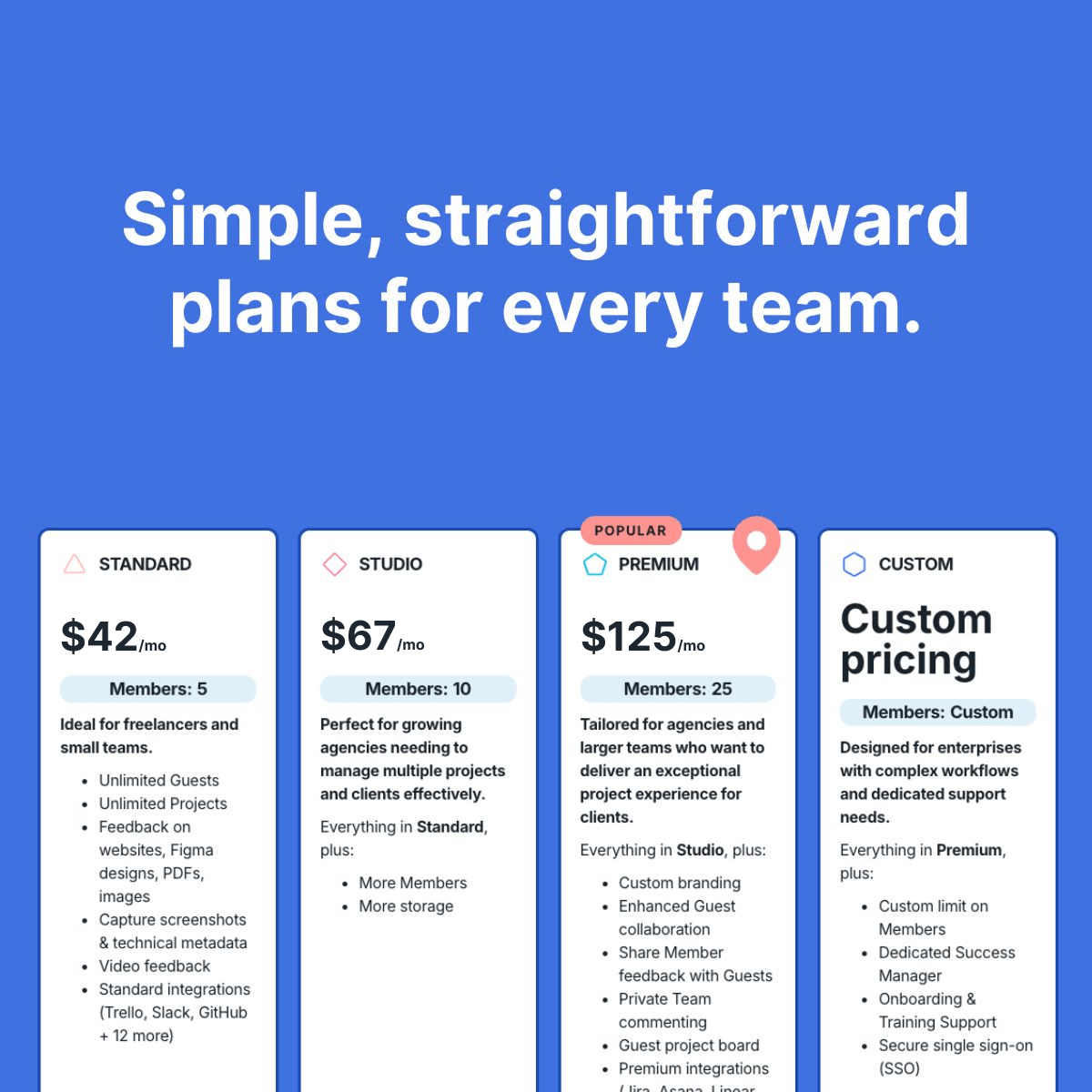
BugHerd provides affordable pricing, starting at $42/month for unlimited projects and unlimited guests, offering great value for money. Every plan comes with key features, and essential integrations, making BugHerd a budget-friendly choice for teams seeking a client-friendly solution for their website QA process.

Whether you’re a small team just getting started or a larger organization managing complex web apps and live websites, BugHerd’s flexible pricing plans ensure you get the functionality you need without overpaying.
More on BugHerd Pricing

BugHerd Features -  What an Agency Needs to Run Clean Website QA

Deliver high-quality website QA with a simple, structured feedback process. BugHerd lets clients and teams leave clear, in-context feedback directly on a website, making it easy to report issues, review changes, and manage QA across both technical and non-technical stakeholders.

Project managers

A single view of every open QA issue across all active client projects. Assign, prioritise, track to sign-off — without chasing developers or sifting through email chains.

QA testers

Log issues directly on the page without leaving the browser. Every report is reproduction-ready the moment it’s filed — no follow-up needed to get technical context.

Developers

Receive fully-formed bug reports with screenshot, browser, OS, and element selector already attached. Spend time fixing, not investigating what was meant.

Designers

Compare the live build against approved designs directly in the browser. Pin visual discrepancies — spacing, fonts, layout breaks — exactly where they occur.

Account managers

Send clients a review link and set a feedback deadline. No more chasing clients for sign-off — and no more surprise issues surfacing after you thought QA was done.

Clients

Point, click and comment directly on the site — no login, no training, no scribbled screenshots. Their feedback lands exactly where your team needs it.

This BugHerd we’ve seen a 56% acceleration in when client changes come back to us, and an 88% reduction in the time we put towards reconciling feedback. That’s huge for an agency our size.”
-
Keenan Beavis, Longhouse Branding & Marketing
“BugHerd makes website QA faster with visual markers, Kanban, and easy client feedback".”
-
G2 review, Kristin H, Owner and UX designer
“BugHerd saves us up to 10 hours per week managing feedback.”
-
Emily Proctor, Web Development Director, Bop Design
BugHerd streamlines your QA process with real-time collaboration.”- Sonnet Digital Solutions

Watch BugHerd in action

See how easy it is for your clients and team to provide feedback. Click on the green dot below to start.

Here are 3 easy tips to great website QA using BugHerd 👇

BugHerd point-click-comment ... easy website feedback

Tip 1:

Instead of asking for customer feedback surveys and getting users to fill out feedback forms, make it easy by grabbing direct customer feedback on the page while your customer is interacting with it.

Tip 2:

Funnel the feedback into a feedback portal or task board so you have one central location to manage it. No chance of losing insights, or missing important feedback.

BugHerd Website Feedback - easy task tracking via Kanban board
BugHerd in-built task board

Tip 3:

Triage the feedback website data into bugs, feature requests, market research or user behavior to help highlight what needs immediate attention and what you can plan for future updates.

But don't just take our word for it.
Customers love us.

award iconaward iconaward iconaward iconaward icon
image of customer
Sam Duncan 📱📏 🌱

@SamWPaquet

icon of review source

"@bugherd where have you been all my life??

We just migrated our bug tracking over from Asana and have at least halved our software testing time🪳👏📈. "

image of customer
Ashley Groenveld

Project Manager

“I use BugHerd all day every day. It has sped up our implementation tenfold.”

image of customer
Sasha Shevelev

Webcoda Co-founder

"Before Bugherd, clients would try to send screenshots with scribbles we couldn't decipher or dozens of emails with issues we were often unable to recreate."

image of customer
Mark B

Developer

icon of review source

“A no-brainer purchase for any agency or development team.”

image of customer
Kate L

Director of Operations

icon of review source

"Vital tool for our digital marketing agency.”

image of customer
Paul Tegall

Delivery Manager

"Loving BugHerd! It's making collecting feedback from non-tech users so much easier."

image of customer
Daniel Billingham

Senior Product Designer

“The ideal feedback and collaboration tool that supports the needs of clients, designers, project managers, and developers.”

image of customer
Chris S

CEO & Creative Director

icon of review source

“Our clients LOVE it”

image of customer
Emily VonSydow

Web Development Director

“BugHerd probably saves us
at least 3-4hrs per week.”

Frequently asked questions

What is website QA testing?
Website QA testing is the process of systematically checking a website for bugs, visual inconsistencies, broken functionality, and cross-browser issues before it is published or handed to a client. For web agencies, it is the final stage between build completion and client sign-off.
How is website QA testing different from UAT?
Website QA testing is different from UAT (user acceptance testing) because it focuses on technical correctness, ensuring the site renders and functions properly across browsers and devices. UAT focuses on whether the site meets agreed business requirements from the client’s perspective. Agencies typically run internal QA before inviting clients into a UAT or review phase.
Does BugHerd work on staging sites?
Yes. BugHerd works on both live and staging environments. For staging sites, install a JavaScript snippet and BugHerd runs on any internal URL. This makes it ideal for agencies running QA before any page is publicly accessible.
When using BugHerd, do clients need to create an account to leave feedback?
No. With BugHerd, clients receive a link and can pin feedback directly on the site without creating an account or logging in. This is one of the most important features for agencies - it removes the biggest friction point in getting clients to participate in the review process.
With BugHerd, can I run QA across multiple client projects at the same time?
Yes. BugHerd lets you create separate projects for each client build, each with its own task board, team members, and client access settings. You can manage QA across as many concurrent projects as needed from a single BugHerd account.
Can BugHerd integrate with Jira, ClickUp, or our existing project management tools?
Yes. BugHerd integrates directly with Jira, Linear, ClickUp, Asana, Trello, Monday.com, Slack, MS Teams, GitHub, and more. Every bug report can sync automatically to your developers’ existing tools so nothing requires manual copy-pasting.
In BugHerd, can I manage structured QA test cases, not just ad hoc bug reports?
Yes. In BugHerd you can create tasks on the Kanban board in advance to represent specific test cases, assign them to QA team members, and link them to pages on the site. Testers then use BugHerd to annotate results directly on the page, combining structured test case management with visual annotation.
Does BugHerd have a free trial?
Yes, BugHerd offers a 7-day free trial with access to all features, including integrations, video feedback, and the Kanban board. No credit card required. There is also a 60-day money-back guarantee after purchase.
Is BugHerd better for agencies than other website qa testing tools?
BugHerd is better for agencies than other visual website QA testing tools because it’s built for both clients and teams; not just testers. Clients can easily pin feedback directly on a website without training, while teams get automatic technical details and a structured workflow. This reduces back-and-forth, speeds up approvals, and makes QA smoother across all stakeholders.
close button