

The problem is that many agencies lack reliable visibility into what is happening across client websites. They may see that something changed, but not who made the change, what was modified, or when it happened. Without that context, troubleshooting becomes guesswork, and accountability becomes difficult to demonstrate.
This is where activity logs become valuable. When implemented properly, they provide agencies with a reliable record of user and system activity, making it easier to investigate issues, explain incidents clearly, and respond with confidence rather than assumptions.
Gathering Client Feedback Is Only Half the Process
Getting a non-technical client to clearly explain what they saw, where they saw it, and what they were doing beforehand is often harder than the technical investigation itself.
Tools like BugHerd help solve that problem. Instead of relying on screenshots and long email threads, clients can pin feedback directly to the issue while browser, screen, and session data are captured automatically. The report your team receives is far more specific and actionable.
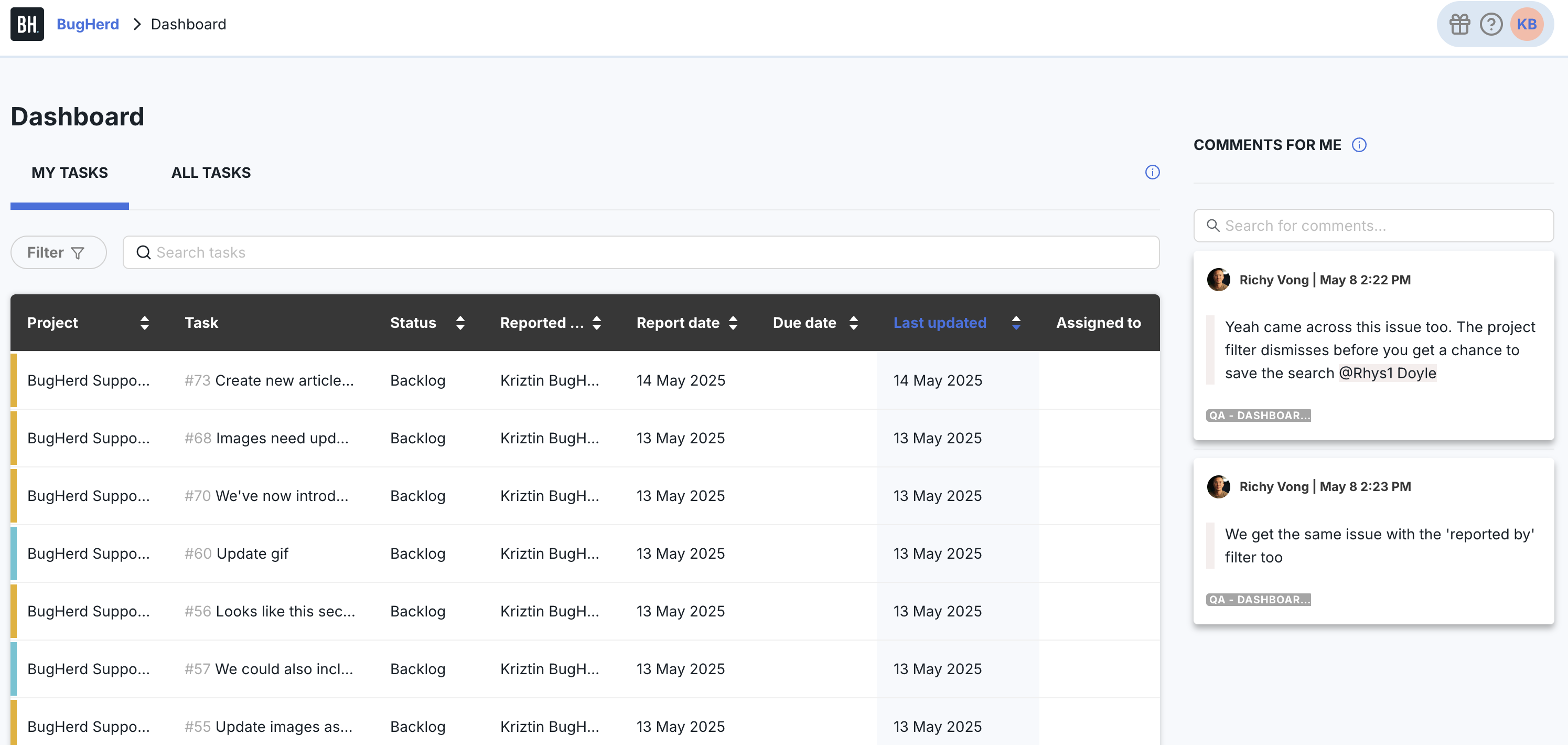
But collecting better feedback only solves part of the problem. Once the report reaches your team, the real investigation begins:
- What changed before the issue appeared?
- Who made the change?
- Was it caused by a plugin update, a settings adjustment, a content edit, or a client-side user action?
This is where many agencies lose visibility. Development workflows, task updates, and team communication may indicate that something changed, but they rarely provide a complete picture of what changed within WordPress itself.
What Makes Activity Logs Reliable
Activity logs help agencies understand what changed, who made the change, and when it happened. That visibility is what turns troubleshooting from guesswork into a structured investigation process.
Plugins like WP Activity Log are designed specifically for this purpose. They record user and system activity within WordPress, including plugin updates, content edits, WooCommerce activity, login events, and many more WordPress settings changes, giving agencies a much clearer activity history during investigations.
However, not all activity logs provide the same level of value. For logs to be genuinely useful during client investigations, four things matter the most:
Detailed records
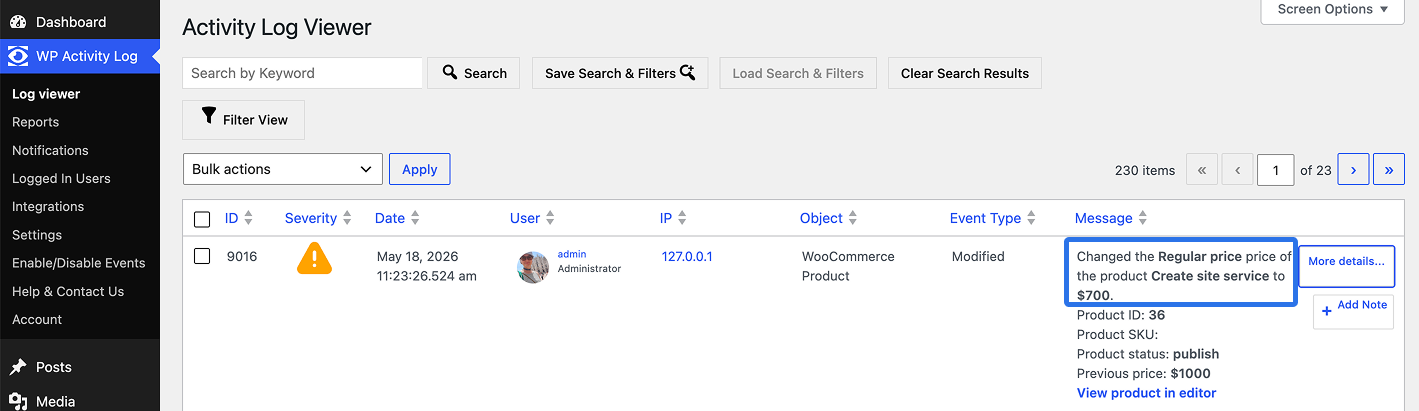
It’s not enough to know that “something changed”. Teams need to know exactly what changed, who made the change, and when it happened.
Quick example: a client says someone changed the product price. You go to the Activity Log Viewer and see exactly when it was changed, who made the change, which product, the previous price, and the new one.
External and centralized log storage
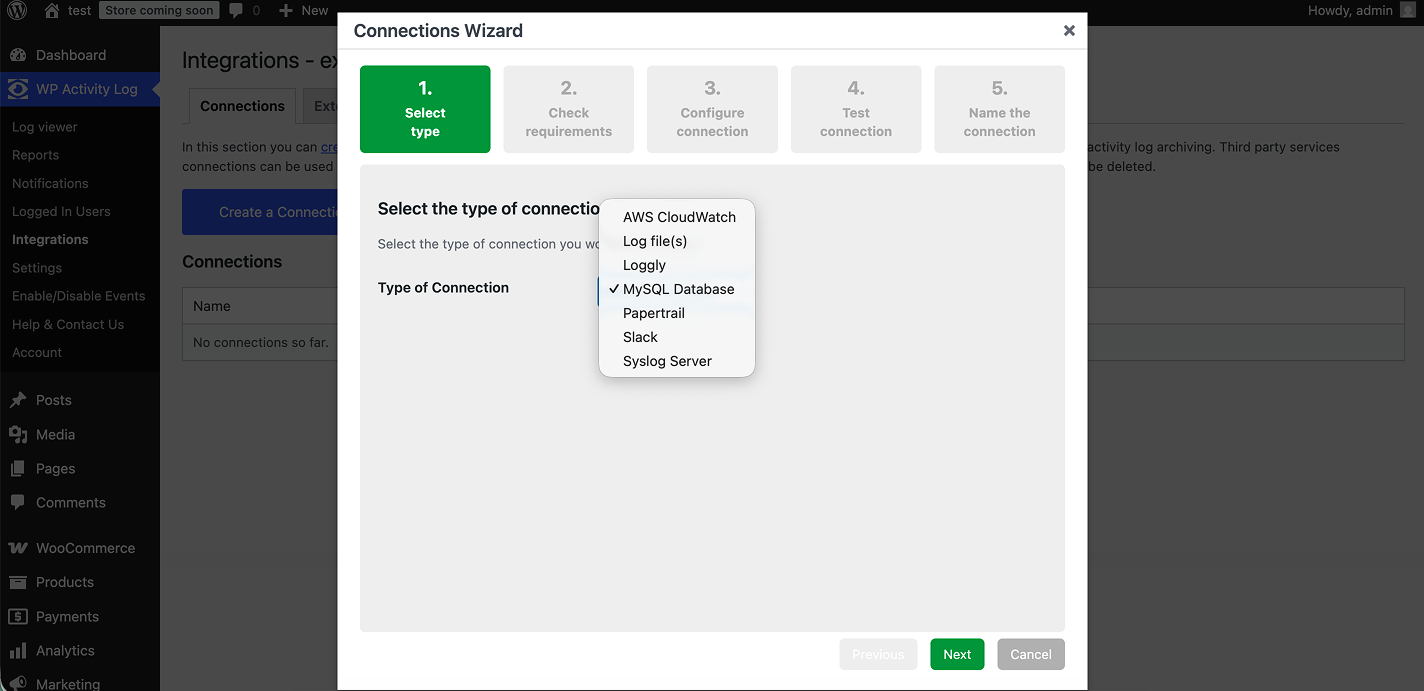
If a site crashes, logs should still be available and stored separately from the WordPress site to reduce the risk of accidental loss or missing log data during an investigation.
For example, if you are managing dozens of client websites, you can store activity logs in external systems such as AWS CloudWatch or external databases like MySQL, allowing administrators to securely review activity across all sites, even if an individual WordPress installation becomes unavailable.
Multisite tracking
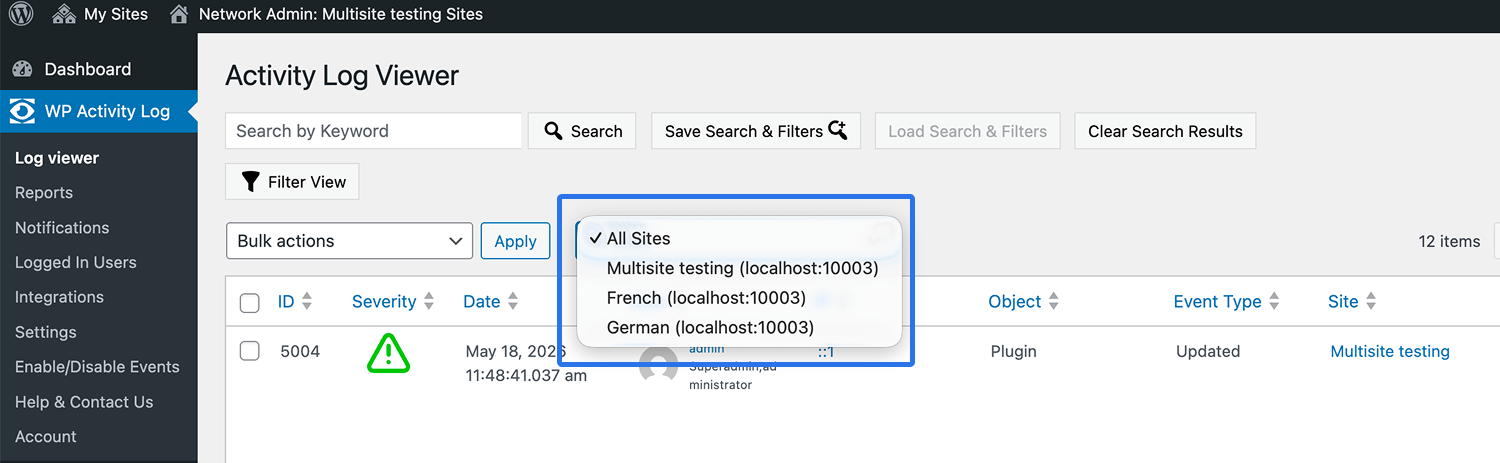
For agencies managing WordPress multisite networks, centralized logging makes it much easier to review activity across all network sites from a single dashboard.
For instance, you can quickly switch between sites, review changes, identify recurring operational issues, and investigate problems without logging into each site individually.
Moving From Reactive Support to Proactive Accountability
Activity logs become far more valuable when combined with real-time alerts. Instead of discovering problems after a client files a ticket, your team can identify important changes as they happen.
But effective alerts depend on context, as every client site operates differently.
For example, an office-based team may log in only during business hours within predictable time ranges, while a fully remote team may log in from multiple locations and time zones throughout the day.
That’s why the notification setup needs to reflect how each client actually operates.
With the premium version of WP Activity Log, agencies can create notifications based on specific events, user roles, IP addresses, and time windows. Instead of manually monitoring everything, you can receive alerts only when activity matches conditions that genuinely matter in that client environment.
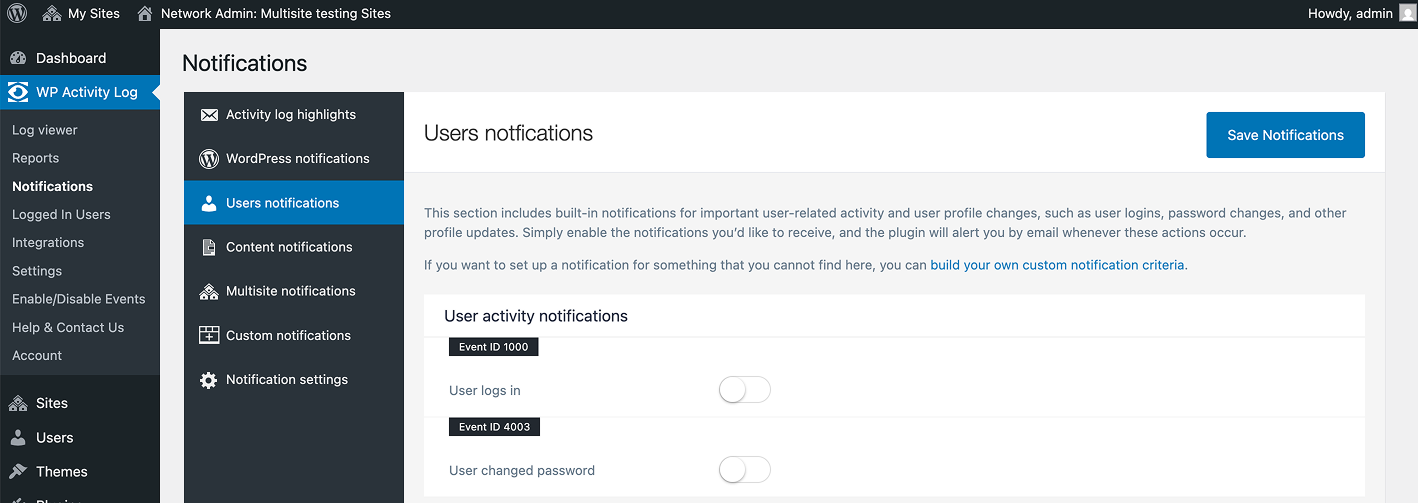
When configured properly, this can significantly improve an agency’s support workflow. Rather than relying entirely on client reports, agencies can sometimes identify suspicious or unexpected activity earlier and investigate issues before they escalate.
Building Activity Logs Into Your Team’s Workflow
To consistently improve response times, activity logs need to be incorporated into the agency’s standard investigation workflow.
A simple approach is to make activity logs part of every investigation workflow:
- Review the client report in BugHerd
- Identify when the issue first appeared
- Check the activity log for changes leading up to that time
- Correlate the issue with recent updates, edits, or user actions
- Resolve the problem and document the cause
The biggest benefit is often client communication itself. When your team can explain exactly what happened and when, support conversations become shorter, clearer, and far less defensive.
That level of clarity is what turns activity logs from a technical feature into a practical accountability tool for agencies.
Start Before Something Goes Wrong
One of the biggest mistakes agencies make with activity logging is treating it as a reactive tool. By the time a serious issue arises, the activity history you need may no longer exist.
That’s why logging should be enabled before problems appear, not after.
Even a basic activity log immediately creates an activity history your team can reference during investigations and troubleshooting. When a client reports a broken workflow, missing content, unexpected user access, or a configuration issue, you already have a record to work from instead of starting from scratch.
The goal is not to record every possible action indefinitely. It’s to ensure your agency has a reliable activity history available when it matters most, especially during high-pressure client situations where speed and clarity directly affect trust.
Frequently Asked Questions
What is a WordPress activity log?
A WordPress activity log records activity within WordPress, including content edits, plugin updates, settings changes, login activity, and user role modifications. It helps teams track what changed, who made the change, and when it happened.
How do activity logs help agencies resolve client issues faster?
Activity logs help teams identify what changed before an issue appeared. Instead of relying on memory or manually retracing steps, agencies can review recent activity and trace problems back to specific updates, edits, or user actions.
What should agencies look for in an activity log plugin?
Agencies should choose a reputable plugin with positive reviews on the WordPress.org repository, a proven track record, and regular updates. Key features include detailed change tracking, searchable logs, reliable log storage, real-time alerts, and support for commonly used plugins such as WooCommerce. For larger teams, centralized log management across multiple client sites is also important.
When should agencies enable activity logging?
Activity logging should be enabled before problems occur, not after. If logs are only installed during an incident, the historical data needed for the investigation may already be missing. Even a basic setup provides valuable context for future troubleshooting.
How does BugHerd work with WordPress activity logs?
BugHerd and WordPress activity logs solve different parts of the troubleshooting process. BugHerd captures client feedback directly on the website, including screenshots, page URLs, browser details, and user context. Activity logs record what happened inside WordPress, such as plugin updates, content edits, settings changes, and user actions. Together, they help agencies quickly understand both what the client experienced and what changed behind the scenes.
Can BugHerd help WordPress agencies resolve issues faster?
Yes. BugHerd eliminates the back-and-forth often required to understand website issues by allowing clients to leave feedback directly on the page where the problem occurs. Combined with WordPress activity logs, agencies can quickly correlate client reports with recent site changes, making it easier to identify root causes and resolve issues faster.

Lana Miro
Lana Miro is a WordPress-focused content marketer with 8+ years of experience in partnerships, affiliate programs, integrations, and content strategy. She creates educational content about WordPress website building and actively participates in WordPress events to stay close to the community.
Try BugHerd on your site
See feedback in context
Click anywhere to leave feedback directly on your website.










But don't just take our word for it.
BugHerd is loved by 10,000+ companies,
350,000+ users across 172 countries.
4.8/5
4.7/5
4.5/5
5/5
8.7/10
Sam Duncan 📱📏 🌱
@SamWPaquet
"@bugherd where have you been all my life??
We just migrated our bug tracking over from Asana and have at least halved our software testing time🪳👏📈. "
Ashley Groenveld
Project Manager
“I use BugHerd all day every day. It has sped up our implementation tenfold.”
Sasha Shevelev
Webcoda Co-founder
"Before Bugherd, clients would try to send screenshots with scribbles we couldn't decipher or dozens of emails with issues we were often unable to recreate."
Mark B
Developer
“A no-brainer purchase for any agency or development team.”
Kate L
Director of Operations
"Vital tool for our digital marketing agency.”
Paul Tegall
Delivery Manager
"Loving BugHerd! It's making collecting feedback from non-tech users so much easier."
Daniel Billingham
Senior Product Designer
“The ideal feedback and collaboration tool that supports the needs of clients, designers, project managers, and developers.”
Chris S
CEO & Creative Director
“Our clients LOVE it”
Emily VonSydow
Web Development Director
“BugHerd probably saves us
at least 3-4hrs per week.”