

Why website content feedback becomes a bottleneck
By the time a website project reaches the content review stage, everything else is usually in place. The design is approved, the site is built, the page is live or on staging.
Then the client feedback start:
- Clients send emails referencing “the text near the top.”
- Screenshots are shared with arrows pointing to paragraphs.
- Google Docs circulate with tracked changes that don’t match the live page.
- Sometimes there’s even a Loom video explaining a single line edit.
Individually, these methods seem workable but in practice, they all create the same issue - someone has to interpret the feedback and match it back to the page.
That interpretation step is where things slow down. It introduces ambiguity, creates back-and-forth, and increases the chance that something gets missed.
What good website content feedback actually looks like
When content feedback works well, it’s simple, precise, and easy to follow.
- The exact text is identified.
- The replacement is clearly written.
- The location is unambiguous.
- And the feedback lives alongside the rest of the project.
Users simply point at the text - say what it should be instead - move on.
There’s nothing to interpret. The person making the change knows exactly what to do and where to do it.
This can only be achieved by using a website feedback tool, but finding the right one can be a challenge when most tools still rely on disconnected workflows or add unnecessary friction.
Without the right setup, teams fall back into the same patterns: unclear comments, scattered feedback, and time lost translating requests into action.
The best website feedback tools remove that friction entirely. They allow users to give feedback directly on the page, in context, with no ambiguity and no extra steps.
Who benefits from using a website feedback tool
Suggesting content changes directly on the page
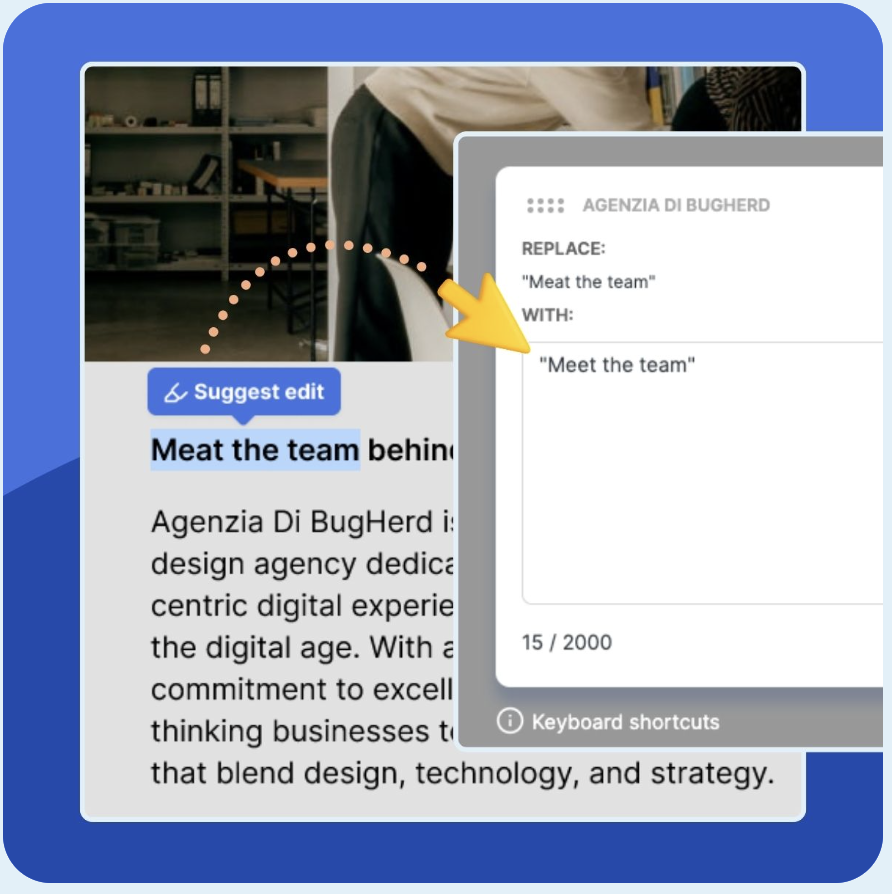
With BugHerd, website content feedback happens directly on the live web page, not in a separate tool. BugHerd makes it easy to highlight any text, suggest changes instantly, and pin feedback to the exact location on the page.
There’s no back-and-forth, no confusion, and no time wasted translating feedback. Just clear, actionable content updates that move projects forward faster.
Instead of describing content changes, you can:
- Highlight any text on the page
- Enter the replacement text
- Submit it instantly
BugHerd automatically captures:
- The original text
- The suggested replacement
- The exact location on the page
- A screenshot along with the all technical details
There’s no need to copy and paste text and no follow-up questions required. This method removes the biggest source of friction in website content feedback: interpretation.
Each suggestion is logged as a task on a Kanban board, where it can be assigned, prioritized, and tracked alongside everything else.
BugHerd also integrates with tools like Jira, Asana, and ClickUp, so content feedback flows into existing project management systems without extra steps.
How to provide website content feedback with BugHerd
Providing feedback on content with BugHerd is simple and requires no technical skills. Here’s how it works:
- Open the website link
Click the link shared by your team or agency to access the live website or staging environment. - Click on the content you want to change
Simply click directly on any text, image, or element on the page. - Leave a Comment
Add your feedback in plain language. You can suggest edits, flag issues, or request changes. - Submit and track progress
Once submitted, your feedback is automatically turned into a task that the team can review, action, and resolve. - Review updates in real time
As changes are made, you can revisit the page, review updates, and mark items as resolved.
BugHerd - a simpler, faster way to handle website content feedback
Website content feedback doesn’t have to slow projects down. Using a tool like BugHerd moves feedback directly onto the live web page, making it quick and easy for clients and stakeholders to provide feedback on content, and for teams to action that feedback.
It removes the need for interpretation, follow-ups, and disconnected tools as every comment is clear, contextual, and instantly actionable via an inbuilt Kanban task board so teams can move from feedback to resolution without friction.
The result is fewer revision rounds, faster approvals, and a smoother experience for everyone involved - from clients and copywriters to developers and project managers.
If your current process relies on emails, documents, screenshots, or cumbersome platforms, you’re adding unnecessary complexity to something that should be simple. BugHerd gives you a better way: clear website content feedback, managed and actioned in one place.
BugHerd offers a free 7-day trial where you can check out all of the features. No credit card is required.
You can also book a 1:1 demo with a BugHerd product specialist, where all of your questions will be answered on the spot.
Get started today!
Frequently Asked Questions
What is website content feedback?
Website content feedback is feedback on the text and messaging on a webpage, including headlines, body copy, CTAs, and labels. It involves identifying what needs to change and providing the replacement.
What is the best way to give website content feedback?
The most effective way to give website content feedback is to use a website feedback tool to highlight the text on a web page and provide the replacement text directly. This removes ambiguity and speeds up implementation. BugHerd is the perfect tool for website feedback.
How do I give feedback on website copy without confusion?
To give feedback on website copy without confusion, always include both the original text and the replacement, and tie it to a specific location on the page. Tools, such as BugHerd, that allow on-page feedback make this much easier.
What’s the difference between content feedback and visual feedback?
Content feedback relates to text and messaging. Visual feedback relates to layout, design, and UI elements. Both are clearer when attached directly to the page.
Can clients give feedback without logging in?
Yes. BugHerd allows clients to access a shared link and leave feedback directly on the site without logging in or creating an account.

Shilpa Wason
Shilpa Wason is Head of Growth at BugHerd, where she helps scale SaaS products through experimentation, data-driven strategy, and clear storytelling. She focuses on website feedback, growth marketing, and conversion optimisation, translating complex problems into practical insights that help teams build better websites and make confident decisions.
Try BugHerd on your site
See feedback in context
Click anywhere to leave feedback directly on your website.







But don't just take our word for it.
BugHerd is loved by 10,000+ companies,
350,000+ users across 172 countries.
4.8/5
4.7/5
4.5/5
5/5
8.7/10
Sam Duncan 📱📏 🌱
@SamWPaquet
"@bugherd where have you been all my life??
We just migrated our bug tracking over from Asana and have at least halved our software testing time🪳👏📈. "
Ashley Groenveld
Project Manager
“I use BugHerd all day every day. It has sped up our implementation tenfold.”
Sasha Shevelev
Webcoda Co-founder
"Before Bugherd, clients would try to send screenshots with scribbles we couldn't decipher or dozens of emails with issues we were often unable to recreate."
Mark B
Developer
“A no-brainer purchase for any agency or development team.”
Kate L
Director of Operations
"Vital tool for our digital marketing agency.”
Paul Tegall
Delivery Manager
"Loving BugHerd! It's making collecting feedback from non-tech users so much easier."
Daniel Billingham
Senior Product Designer
“The ideal feedback and collaboration tool that supports the needs of clients, designers, project managers, and developers.”
Chris S
CEO & Creative Director
“Our clients LOVE it”
Emily VonSydow
Web Development Director
“BugHerd probably saves us
at least 3-4hrs per week.”