

Contents
- Who is this Bug Reporting Guide for?
- What is Bug Reporting?
- What's the Difference Between Bug Reporting and QA?
- What is a Bug Reporting Tool?
- Why Should I Use a Bug Reporting Tool?
- What’s the Easiest Way to Report Bugs Quickly?
- What Features Does a Good Bug Reporting Tool Have?
- What are the Best Bug Reporting & QA Tools?
- What are the Common Mistakes in Bug Reporting & QA?
- Which Bug Reporting Tool is Best for QA Teams?
- FAQs About Bug Reporting & QA
Key Takeaways
- Effective bug reporting focuses on clarity and structure, not volume.
- A good bug report includes steps to reproduce, expected result, actual result, and visual proof.
- Bug reporting tools standardize how bugs are captured and resolved.
- Visual bug reporting reduces back-and-forth for development teams.
- Technical details like browser and operating system are critical for fixing bugs.
- Centralized bug tracking prevents duplicate reports and lost issues.
- Tools built for non-technical users improve the quality of user feedback.
- The best tools combine bug reporting and bug tracking in one workflow.
- BugHerd lets teams report bugs directly on live websites.
- Clear bug reporting leads to faster fixes and better quality of software and websites.
Who is this Bug Reporting Guide for?
If you build, test, manage, or approve software or websites, this guide is for you including:
- Web developers testing websites, login pages, and web apps
- QA testers responsible for finding and reporting software and/or website bugs
- Software developers who need actionable bug reports, not guesswork
- Project managers coordinating QA, releases, and the feedback loop
- Product teams improving software quality and efficient testing
- Non technical users who still need an easy way to report bugs directly
If your current bug reporting process relies on long emails, screenshots pasted into chat, or poorly written feedback forms - you’re in the right place.
What is Bug Reporting?
Bug reporting is the process of identifying, documenting, and tracking bugs/issues within software or a website, so development teams can understand what’s broken, why it happens, and how to fix it.
A bug report explains:
- Where an bug/issue occurs
- When the bug appears
- What the actual result is
- What the expected result should be
- How to reproduce the issue
Good bug reporting is the foundation of effective QA (quality assurance). Bad bug reporting slows the debugging process, creates confusion, and leads to the same bug being reported multiple times.
What's the Difference Between Bug Reporting and QA?
Bug reporting is about identifying and documenting issues. When something doesn’t work as expected, a bug report clearly explains what happened, where it happened, how to reproduce it, and what the expected result should be. It’s focused on communication so developers can fix the issue quickly.
QA (Quality Assurance) is much broader. QA is a process, not a task. It includes planning test cases, defining quality standards, testing features, preventing defects, and improving workflows across the entire product lifecycle. Bug reporting is just one small part of QA.
In short: QA aims to prevent problems; bug reporting documents them once they’re found.
What is a Bug Reporting Tool?
A bug reporting tool is software that helps users capture, document, and track bugs in a structured, standardized format.
Instead of writing “the button at the top of the login page is broken” in an email, a bug reporting tool lets users:
- Click directly where the bug occurs
- Add a description of the issue
- Capture visual evidence like screenshots or screen recording
- Automatically log environment details like:
- Operating system
- Browser version
- Software version
- Device logs and console logs
The best bug reporting tools also connect directly to a bug tracking system, turning feedback into tasks that teams can assign, prioritize, and resolve.

Why Should I Use a Bug Reporting Tool?
You should use bug reporting software because it gives development teams clear, structured, and actionable bug reports, making it faster to understand issues, reproduce bugs, and fix them with confidence.
Without a proper bug reporting system, teams rely on:
- Vague messages
- Missing steps to reproduce
- Outdated screenshots
- Incomplete technical details
This leads to bad bug reports, repeated questions, and wasted time.
A good bug reporting tool improves QA by:
- Standardizing every bug report
Each report follows the same process and includes key details automatically. - Capturing visual proof
Screenshots and video remove ambiguity. - Reducing back-and-forth
Developers don’t need to ask for browser version, operating system, or error message details. - Preventing duplicate bugs
Teams can search existing bug databases to avoid reporting the same bug twice. - Improving software quality long-term
Better bug logs lead to better insights and fewer recurring issues.
“A bug tracking system is a software application that keeps track of reported software bugs in development projects and is considered one of the hallmarks of a good software team. It provides a clear, centralized overview of issues and their status, helping teams manage, prioritize, and resolve defects systematically.” - Wikipedia
What’s the Easiest Way to Report Bugs Quickly?
The easiest way to report bugs quickly is to use a bug reporting tool that captures context automatically; but your actual process still matters.
Step 1: Align on your bug reporting process
Before testing starts:
- Define how bugs should be reported
- Decide where bugs are tracked (one tracking system)
- Agree on what makes a good bug report
This avoids confusion later.
Step 2: Test in real environments
QA should cover:
- Multiple browsers
- Different operating systems
- Various screen sizes
This is where many software bugs appear under unusual circumstances.
Step 3: Capture bugs in context
When a bug occurs:
- Click directly on the affected element
- Record steps to reproduce
- Capture screenshots or screen recording
- Include expected result vs actual result
BugHerd makes this effortless for both testers and non technical users.
Step 4: Track bugs in one system
All bugs should flow into a single issue tracking system so teams can:
- Track bugs
- Assign ownership
- Prioritize fixes
- Avoid the same process being repeated across tools
Step 5: Keep feedback open post-launch
QA doesn’t stop at release.
'Always-on' feedback helps catch new bugs, minor UI issues, and edge cases early.
What Features Does a Good Bug Reporting Tool Have?
A good bug reporting tool makes it easy to submit effective bug reports and just as easy for development teams to act on them.
Key features of a good bug reporting tool include:
- Point-and-click bug capture
Users can report bugs directly on the interface or web page - Screen recording/video support
Perfect for bugs that appear during interactions or animations. - Automatic screenshots & visual evidence
Every report includes visual proof - Environment details captured automatically
Feedback includes OS, browser version, software version, device information, etc. - Built-in bug tracking system
Bugs move from open → in progress → resolved. - Easy for non technical users
No training required to submit a well crafted bug report. - Integrations with development tools
Syncs with project management and development tools such as Jira, GitHub, ClickUp, etc.
What are the Best Bug Reporting Tools in 2026?
The best bug reporting tools in 2026 do more than log issues ... they help teams capture bugs with full context, reduce back-and-forth emails, and turn feedback into actionable fixes. Below, we’ve rounded up some of the top bug reporting and QA tools to help you compare features, workflows, and use cases.
What are the Common Mistakes in Bug Reporting & QA?
- Writing vague bug descriptions
“It doesn’t work” is not an effective bug report. Train your users to provide more details, and accurate descriptions. - Not including visual proof
Screenshots and screen recordings matter. Use a bug reporting tool that automatically captures a screenshot that can then be annoated. - Ignoring environment details
Browser version and operating system often explain why a bug appears. It's important to use a tool that captures these automatically so that devs don't need to go back and forth trying to find these details out. - Using multiple tracking systems
Bugs get lost when feedback is scattered. Use one bug tracking tool only and keep everything in the one spot. - Missing steps to reproduce
Without steps, developers can’t replicate the bug.
Take a More Structured Approach to Website QA
Effective bug reporting starts with effective testing.
The more structured your QA process is, the easier it becomes to identify issues, create clear bug reports, and ensure nothing gets missed before launch.
To help web teams and agencies run more thorough website QA, BugHerd's free Website QA Checklist covers the key areas every website should be tested against before going live, including functionality, design, content, accessibility, SEO, AEO, performance, and browser compatibility.
Whether you're preparing for a website launch or managing ongoing website updates, the checklist provides a practical framework for finding and documenting issues more efficiently.
👉 Download the free Website QA Checklist
Which Bug Reporting Tool is Best for Agencies & QA Teams?
BugHerd is the best bug reporting tool for agencies and QA teams because it lets users report bugs directly on live websites, automatically captures screenshots and technical details, and turns every bug report into a trackable task; making QA faster, clearer, and easier for both technical and non-technical users.
BugHerd's key features include:
- Visual point‑and‑click bug tracking tied to exact elements on a web page or software platform. Clients and stakeholders simply use the arrow icon to click directly on any element and drop a pin/comment (like sticky notes on a page).
- Capture feedback via video and leave feedback on multi-step interactions, animations, and anything else that’s difficult to describe with written words alone.
- Automatic screenshot & user tech details captured, including browser, OS, URL, screen size, resolution, etc.
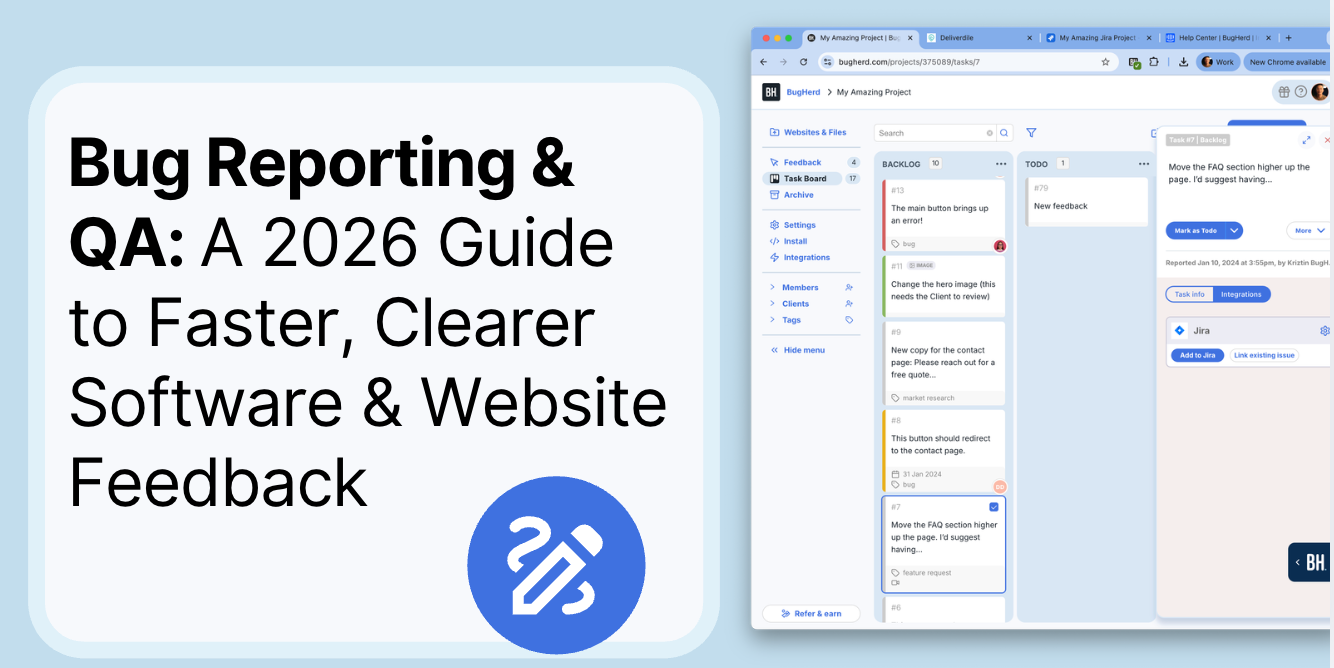
- Task tracking via a built‑in Kanban board to assess, assign, prioritize, and action bugs. BugHerd also keeps clients updated by allowing them access to the task board (you determine the level of access), for real-time visibility, especially on critical issues.
- BugHerd has deep two-way integrations with all project management tools such as Jira, ClickUp, monday.com, Asana, Trello, and more; as well as supporting integrations with collaboration tools like Slack & Microsoft Teams, and developer tools like GitHub. BugHerd also has a fully featured API and Webhook support, enabling custom integrations with any application.
- No client login required. Clients and stakeholders are sent a link and they can start reporting bugs right away without having to set up a login.
- Ongoing public feedback is easy with BugHerd’s public feedback widget, which lets visitors share feedback directly from your live website.
BugHerd is especially effective for teams that need clear communication between testers, project managers, and developers, without forcing everyone into complex tools.
BugHerd offers a free 7-day trial where you can check out all of the features.
You can also book a 1:1 demo with a BugHerd product specialist, where all of your questions will be answered on the spot.
“BugHerd helps development agencies by streamlining their website bug reporting and internal collaboration processes… it simplifies the process of identifying and resolving errors or design inconsistencies for the marketing agencies managing website content and campaigns.” - Geekflare
FAQs About Bug Reporting & QA
What is the most effective way to report a software bug?
The most effective way to report a software bug is to use a visual bug reporting tool that captures steps to reproduce, expected result, actual result, screenshots or video, and environment details such as browser version, operating system, and screen size. Tools like BugHerd automatically collect this information and turn each report into a trackable task.
What information should every bug report include?
Every effective bug report should include a concise summary, clear steps to reproduce, the expected result, the actual result, visual evidence (screenshots or screen recording), and technical context such as browser version, operating system, and device details. Missing any of these elements slows down the debugging process.
How do bug reporting tools improve software quality?
Bug reporting tools improve software quality by standardizing how bugs are reported, reducing ambiguity, and ensuring development teams receive actionable bug reports. By capturing visual proof and technical details automatically, tools like BugHerd help teams identify root causes faster and prevent recurring software bugs.
What’s the difference between bug reporting and bug tracking?
Bug reporting is the process of capturing and documenting a bug when it occurs, while bug tracking is the process of managing that bug through its lifecycle using an issue tracking system. BugHerd combines both by allowing users to report bugs visually and automatically logging them into a built-in tracking system.
Can non-technical users create effective bug reports?
Yes. Non-technical users can create effective bug reports when using tools designed for visual feedback. BugHerd allows users to report bugs by clicking directly on the interface, while automatically capturing technical details that non-technical users may not know how to provide manually.
How do teams avoid duplicate bug reports?
Teams avoid duplicate bug reports by using a centralized bug tracking system where all reported bugs are visible and searchable. BugHerd helps prevent duplicates by keeping all bug reports in one shared bug log, making it easy to review existing issues before reporting a new bug.
Why are screenshots and screen recordings important in bug reports?
Screenshots and screen recordings are important in bug reports because they provide visual proof of how a bug appears and behaves, reducing misinterpretation. Visual evidence helps developers quickly understand the issue, especially for UI bugs, animation issues, or bugs that occur during multi-step interactions.
What makes BugHerd different from traditional bug tracking tools?
BugHerd is different from traditional bug tracking tools by focusing on visual, in-context bug reporting. Instead of requiring manual forms and templates, BugHerd lets users report bugs directly on live websites, automatically capturing screenshots, environment details, and turning feedback into actionable tasks.
Is BugHerd suitable for QA teams and agencies?
Yes. BugHerd is designed for QA teams and agencies that need fast, clear communication between testers, project managers, developers, and clients. Its client-friendly interface and built-in bug tracking make it especially effective for teams managing multiple projects and stakeholders.
Does BugHerd require users to install complex software?
No. BugHerd works through a browser extension and simple links, allowing users to report bugs without complex setup. This lowers friction for QA teams. There's no need for clients or external stakeholders to create an account or log in. They are simply sent a link and they can start reporting bugs right away.
How do clear bug reports help teams fix bugs faster?
Clear bug reports help teams fix bugs faster by removing ambiguity from the debugging process. When a bug report includes steps to reproduce, expected result, actual result, and visual context, developers can identify the root cause quickly without needing follow-up questions. BugHerd accelerates bug fixes by automatically capturing this information and attaching it to each report.

Shilpa Wason
Shilpa Wason is Head of Growth at BugHerd, where she helps scale SaaS products through experimentation, data-driven strategy, and clear storytelling. She focuses on website feedback, growth marketing, and conversion optimisation, translating complex problems into practical insights that help teams build better websites and make confident decisions.
Try BugHerd on your site
See feedback in context
Click anywhere to leave feedback directly on your website.











But don't just take our word for it.
BugHerd is loved by 10,000+ companies,
350,000+ users across 172 countries.
4.8/5
4.7/5
4.5/5
5/5
8.7/10
Sam Duncan 📱📏 🌱
@SamWPaquet
"@bugherd where have you been all my life??
We just migrated our bug tracking over from Asana and have at least halved our software testing time🪳👏📈. "
Ashley Groenveld
Project Manager
“I use BugHerd all day every day. It has sped up our implementation tenfold.”
Sasha Shevelev
Webcoda Co-founder
"Before Bugherd, clients would try to send screenshots with scribbles we couldn't decipher or dozens of emails with issues we were often unable to recreate."
Mark B
Developer
“A no-brainer purchase for any agency or development team.”
Kate L
Director of Operations
"Vital tool for our digital marketing agency.”
Paul Tegall
Delivery Manager
"Loving BugHerd! It's making collecting feedback from non-tech users so much easier."
Daniel Billingham
Senior Product Designer
“The ideal feedback and collaboration tool that supports the needs of clients, designers, project managers, and developers.”
Chris S
CEO & Creative Director
“Our clients LOVE it”
Emily VonSydow
Web Development Director
“BugHerd probably saves us
at least 3-4hrs per week.”