

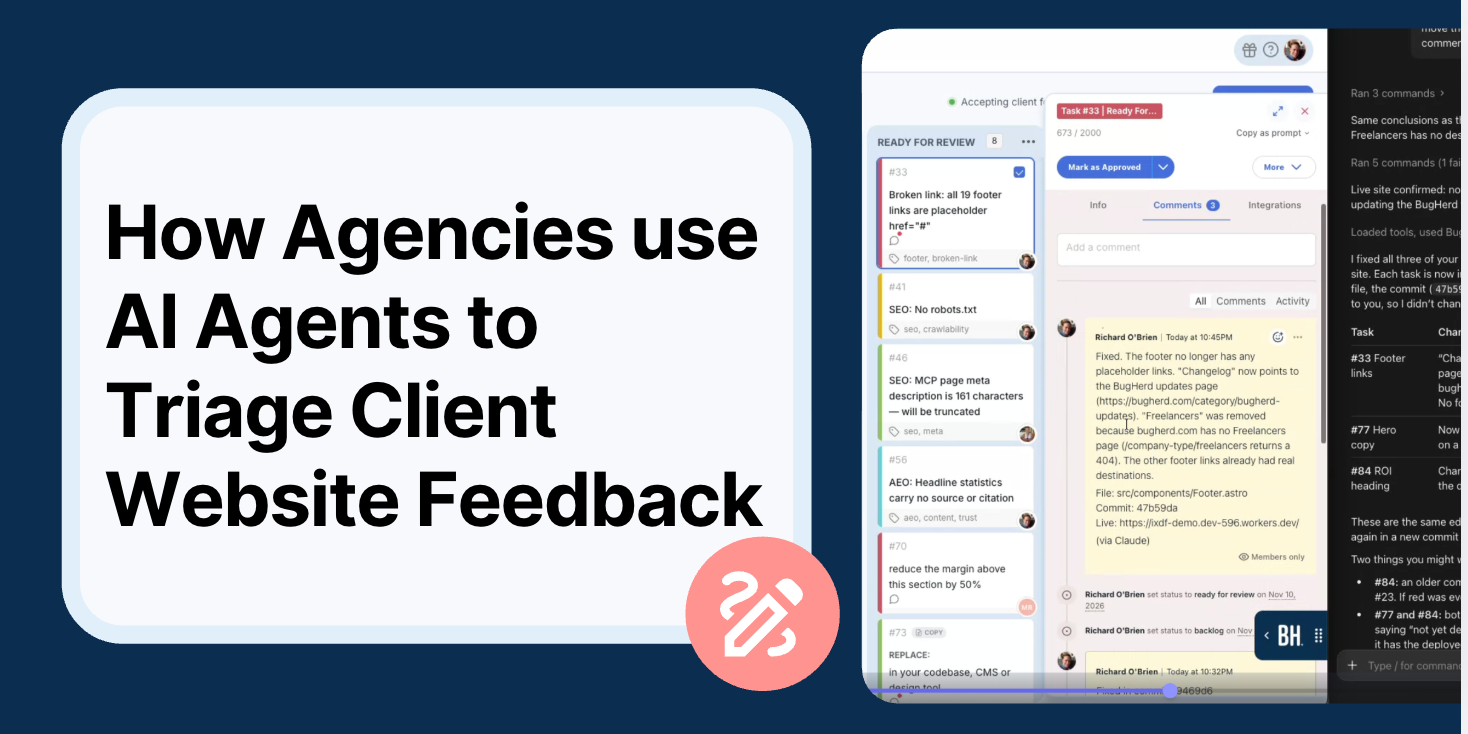
Can AI agents triage client feedback on websites?
Yes, AI agents can definitely triage client feedback on websites. For example, when you connect BugHerd's MCP to an AI agent like Claude or Cursor, the agent can read every task on your board, group the duplicates and separate what it can handle itself from what needs a person, while you stay in charge of what gets signed off. It's a bit like gaining a new team member who happens to be very fast at the tedious parts.
MCP, or Model Context Protocol, is the standard way AI agents connect to the tools you already use. BugHerd's MCP gives your agent the same access to your projects that you have, so it can read client comments, look at screenshots, see which page an issue is on and, if you allow it, move or assign tasks.
What is BugHerd and what does BugHerd's MCP do?
BugHerd is a visual website feedback and bug tracking tool that helps agencies and web teams collect, manage and action client feedback. Clients can leave comments directly on a live or staging website, with each comment pinned to the relevant page element and automatically captured as a task with a screenshot, URL and technical details. Teams can then manage and track that feedback through BugHerd's built-in Kanban board.
BugHerd's MCP lets an AI agent work with your BugHerd projects in much the same way a team member would. Depending on the permissions you give it, your agent can:
- list your projects and pull their details
- read every task, including the client's comment, the screenshot, the page URL and the browser and device details
- create new tasks, for example from an automated test run
- assign tasks to people and move them between columns on your board
- add comments to tasks
- summarize a board, group duplicates and build reports from task history
- and much more
It works with MCP-compatible agents such as Claude and Cursor, and it's available on all BugHerd plans. You can read more about it, alongside BugHerd's other AI features here : https://bugherd.com/feature/ai
Four ways agencies are using AI to triage website feedback
Agencies are using BugHerd's MCP in different ways, depending on their workflows and how much responsibility they want to give their AI agents. Some use it to organize large backlogs of client feedback, while others are taking things further by automating QA processes, assigning tasks and generating project reports.
The following four examples show how agencies are putting BugHerd's MCP to work, starting with one of the simplest approaches: using AI to make sense of a backlog without making any changes to it.
1. Clearing a backlog without touching anything
Read-only triage is the easiest way to start with BugHerd's MCP, because the agent can read, summarize and group every task without changing anything.
BugHerd customer, Ollie Brazier from Oxygen Digital, ran a website project where a client left close to 1,700 comments. He used the BugHerd MCP and gave Claude access to look at everything but not to edit or move a thing. "I haven't developed the courage yet to allow Claude to go in and edit things for me," he told us. Even with that limit in place, it changed how he worked dramatically. One of his go-to prompts was simply:
"Go through all backlog bugs, provide me an answer for any that you think we can answer, and just move along quickly."
From there he used it to round up dozens of near-identical comments so they could be consolidated. Claude gathered everything into a single tracking sheet and checked it against the original scope. "I can't even tell you how much time it saved me on my last project," Ollie said.
2. Planning and working through a whole QA task board
Full-board triage means letting BugHerd's MCP plan and work through an entire QA task board in one go. You simply connect the BugHerd task board to Claude and ask for a triage plan before letting it work through everything on the board. Setup only takes a few minutes, and the prompt to Claude would look something like:
Make a triage plan for everything on the [project name] board in BugHerd. Group any duplicates, flag anything unclear, and tell me which tasks you can resolve and which need a developer. Don't comment on or move anything until I've approved the plan.
The main thing to remember is that you have to decide upfront what the agent is allowed to do. On a board with 150+ tasks it's tempting to just say "go for it", but some of those tasks will have clients watching, so it pays to be clear about whether the agent can comment and who will see it. But note that on BugHerd subscription plans that include members-only comments, comments posted through BugHerd’s MCP can be configured to be visible only to your team, not your clients.
3. Feeding automated QA straight into BugHerd
BugHerd can also be part of an automated website QA workflow, where testing tools identify issues and feed them into BugHerd for tracking and resolution.
Brandon Marshall from LightSpeedWP built an automated QA system using Playwright that checks his agency's website for accessibility issues, broken links, responsive layout problems and other errors. Test failures automatically become BugHerd tasks through its REST API, with duplicate issues grouped into a single task. Brandon then uses Claude Code, connected through BugHerd's MCP, to investigate issues and manage the board. A single test run can generate 30 or more tasks in seconds, saving what could otherwise take days of manual work.
Another agency developer uses a similar approach, running automated tests across client websites and using an AI agent to create grouped tasks through BugHerd's MCP. On a recent project, the agent helped plan around 32 development tasks in just a few minutes.
His prompt after each test run looks something like this:
Take the failures from this test run, group them by issue, and create one task per issue in the [project name] project in BugHerd. List every affected URL in each task so we're not duplicating work.
For project managers, this means less time manually logging and organising bugs, with QA issues tracked alongside client feedback in one place.
4. Reporting without building a dashboard
BugHerd's MCP can also help project managers track progress and generate reports without manually pulling information from their task boards.
For example, a PM overseeing an ecommerce rebuild with more than 100 UAT issues uses Claude to refresh an HTML report each day using data from BugHerd. The report shows what's open, which issues are waiting on the client or agency, how many tasks are resolved each week and which have been reopened. In his words, it "kills the need for reporting."
Brandon Marshall from LightSpeedWP also uses Claude Code and BugHerd's MCP to review tasks and keep his board organised, making it easier to stay on top of outstanding issues without constantly switching between tools.
A daily reporting prompt can be as simple as:
Pull every task from the [project name] project in BugHerd and update this report: open tasks by status, which ones are waiting on the client and which are waiting on us, tasks resolved this week, and any that were reopened after being marked done. Tell me the total number of tasks so I can check it against the board.
One important tip from the PM is to check that the report totals match what's on the BugHerd board. AI can take care of the reporting, but it's still worth verifying the numbers.
Why BugHerd MCP works for triaging feedback: the agent already has the context
BugHerd's MCP works for triage feedback because every task already carries the context an AI agent needs. Most AI triage falls over at the same point, which is that the agent has no idea what the client was looking at when they left the feedback.
With BugHerd every piece of feedback a client leaves on your site is captured along with their comment, a screenshot of what they saw, the page URL, their browser and operating system, and the task's status, assignee, tags and due date.
So when your agent picks up a comment like "the button looks weird on my phone," it can see which button, on which page and on which device, without anyone having to write it a brief.
How is BugHerd different from an AI coding agent?
BugHerd and AI coding agents serve different but complementary purposes. BugHerd collects visual website feedback from clients and turns it into actionable tasks, while coding agents like GitHub Copilot and Cursor help developers make changes to the code.
The challenge is that client feedback is often vague. A comment like "this button doesn't look right" might make sense to the person leaving it, but a developer or AI agent needs more context to understand and resolve the issue.
BugHerd captures that context automatically, including the client's comment, a screenshot, the page URL and browser details. Through BugHerd's MCP, AI coding agents can access this information, investigate the issue and work towards a fix without someone having to manually interpret and rewrite the feedback.
Turning client website feedback into automated tasks
BugHerd automatically turns every piece of client feedback into a task on an integrated Kanban board, and the BugHerd MCP lets an AI agent pick those tasks up and move them along. In the more advanced setups, an agent triages the task board first thing in the morning, writes a short brief on what's come in, then works through the tasks it can handle. It moves each one to "Doing" while it works, then to Ready for Review, and assigns the person who needs to check it.
That makes BugHerd a natural starting point for turning client feedback into Claude Code or Cursor work. Because each task includes the client’s feedback along with the screenshot, page URL and other client technical details, the agent has what it needs to write the fix, and your developer only has to review the change rather than decode the request.
If your team plans work in another tool, BugHerd's integrations with tools like Jira, Asana, Trello, GitHub, Monday, Slack and many more keep that work connected, so tasks resolved through the MCP don't have to be updated twice. Developers can also reference a BugHerd task in their commit messages so code changes are logged against the original feedback.
Where people stay in the loop
With BugHerd's MCP, an AI agent can triage and resolve client website feedback, but a person still reviews the work. Both the Oxygen Digital and LightSpeed teams always have someone signing work off. In practice, the work splits into three stages:
- Triage, where the agent reads, sorts, dedupes and routes the feedback.
- Resolve, where it handles routine work such as copy tweaks, image swaps and small CSS or responsive fixes. BugHerd’s own production data suggests that about 50% of client feedback falls into this category.
- Review, where a person checks the work and approves it before the client sees anything.
As a rough guide, this is how the work tends to split:
How much people hand over tends to grow as their trust does.
BugHerd MCP for PMs - give a try!
You can try AI triage on your own BugHerd board in a few minutes. This video demonstrates how a project manager can connect BugHerd to Claude and triage client feedback. This is the prompt used, and you can swap in your own project and team names:
Review the [project name] project on BugHerd, and any task that could be resolved by an agent, I want you to assign to [developer 1] or [developer 2]. Assign the tasks evenly between them and then, anything that is a bit obscure or may require further discussion, just assign to me. Once you've done that, give me a summary of all the newest feedback that has come in and highlight anything that needs my attention.
The whole thing takes about a minute. Front-end fixes went to one developer, SEO and AEO issues went to the other, and anything unclear came back to the PM to follow up with the client, which saved somewhere between half an hour and an hour of sorting. From there, a quick follow-up prompt moves the work along:
Move all of the tasks assigned to [developer 1] in the backlog over to To Do, and draft a Slack message for me to send them about it.
If you’re a BugHerd customer and you'd like to set this up yourself, start by installing the BugHerd MCP for your AI agent, using the setup guides for Claude, Cursor and the other major agents (refer to the BugHerd MCP Setup Guide)
A simple way to test BugHerd MCP out is to ask for a summary or a triage plan before you let the agent move anything. Once you're ready to give it more, decide what it can touch, such as who it can assign work to and whether it should comment on client-facing tasks, before you tell it to go ahead.
If you’re not yet a BugHerd customer, start a free 7-day trial and check it out for yourself (no credit card required). If you’d prefer to have someone take you through the BugHerd platform and BugHerd MCP, book a 1:1 demo with one of our team members.
Frequently asked questions about BugHerd MPC
Can AI agents triage and resolve website bugs automatically?
AI agents can triage client website feedback and handle a lot of the routine fixes, like copy changes, image swaps and small styling issues. Most agencies still have a person review the work before it goes to the client.
What tools let AI fix client feedback automatically?
For AI to fix client feedback automatically you need a feedback tool with that captures client feedback with enough context for an agent to act on; and an agent that can reach it. BugHerd captures feedback on your live or staging website with a screenshot, URL and browser details, and its MCP connects that to agents like Claude and Cursor.
Which website feedback tools have an MCP server?
BugHerd has an MCP servier.. Its MCP lets an AI agent read tasks with their screenshots and page URLs, create and assign tasks, move them across your board and add comments. When you compare options, check what each MCP actually exposes: can the agent see screenshots and page URLs, assign tasks, and move them across your board? Read-only access is a good test of whether it's useful before you give it more.
Can AI triage client feedback without a developer manually sorting it first?
Yes. That's the main thing agencies use BugHerd's MCP for. The agent reads the board, sorts tasks into what it can handle and what needs a person, and routes them. A developer or PM then reviews.
Do I have to give the AI permission to edit tasks?
No. Plenty of teams start read-only and use it for summaries, grouping and triage plans. You can open up more access later.
Will BugHerd MCP work with my AI tool?
BugHerd's MCP works with MCP-compatible agents, including Claude, Claude Code, Cursor, ChatGPT, VS Code with GitHub Copilot, Windsurf, Codex CLI, Gemini CLI and Zed and setup takes a few minutes. You’ll find a guide for each one in the BugHerd help centre.
Which website feedback tools sync AI-resolved tasks back to Jira or Asana?
BugHerd integrates with project management tools including [confirm: Jira and Asana], so when an AI agent resolves or updates a task through BugHerd's MCP, your team doesn't have to update it in two places.
Which website feedback tools are easiest to hook up to Claude or Cursor?
BugHerd's MCP connects to Claude and Cursor using the setup guides in the BugHerd help centre, and the agencies we spoke to described setup as quick and painless. Once it's connected, you can start with a plain-English prompt like "summarise the newest feedback on my board."
Can I set up an AI agent to do continuous QA on my website?
Yes. You can run automated checks for accessibility, broken links, missing alt text and responsive layout issues, then have an agent create grouped BugHerd tasks from the results through the MCP. Your team reviews and fixes them on the same board as client feedback.
What are the best AI tools for an agency to handle client requests and tickets?
For website projects, you want a tool that captures client feedback with visual context and lets an AI agent work with it. BugHerd captures feedback directly on your live or staging site and, through its MCP, lets agents like Claude and Cursor triage, assign and report on it.
What are the best AI bug tracking tools for web agencies?
Look for three things: visual feedback captured on the website itself, automatic technical context like screenshots, URLs and browser details, and an MCP so AI agents can work with your board. BugHerd is built for agencies and covers all three.
Can I turn client feedback into Claude Code or Cursor prompts?
Yes. Because every BugHerd task includes the client's comment, a screenshot and the page URL, an agent connected through BugHerd's MCP can turn that task into a code change for your developer to review, without anyone rewriting the request first.

Shilpa Wason
Shilpa Wason is Head of Growth at BugHerd, where she helps scale SaaS products through experimentation, data-driven strategy, and clear storytelling. She focuses on website feedback, growth marketing, and conversion optimisation, translating complex problems into practical insights that help teams build better websites and make confident decisions.
Try BugHerd on your site
See feedback in context
Click anywhere to leave feedback directly on your website.







But don't just take our word for it.
BugHerd is loved by 10,000+ companies,
350,000+ users across 172 countries.
4.8/5
4.7/5
4.5/5
5/5
8.7/10
Sam Duncan 📱📏 🌱
@SamWPaquet
"@bugherd where have you been all my life??
We just migrated our bug tracking over from Asana and have at least halved our software testing time🪳👏📈. "
Ashley Groenveld
Project Manager
“I use BugHerd all day every day. It has sped up our implementation tenfold.”
Sasha Shevelev
Webcoda Co-founder
"Before Bugherd, clients would try to send screenshots with scribbles we couldn't decipher or dozens of emails with issues we were often unable to recreate."
Mark B
Developer
“A no-brainer purchase for any agency or development team.”
Kate L
Director of Operations
"Vital tool for our digital marketing agency.”
Paul Tegall
Delivery Manager
"Loving BugHerd! It's making collecting feedback from non-tech users so much easier."
Daniel Billingham
Senior Product Designer
“The ideal feedback and collaboration tool that supports the needs of clients, designers, project managers, and developers.”
Chris S
CEO & Creative Director
“Our clients LOVE it”
Emily VonSydow
Web Development Director
“BugHerd probably saves us
at least 3-4hrs per week.”